
Introducing Agent-Native Workflows in DealSage
The DealSage Agent executes multi-step M&A workflows autonomously. Run end-to-end deal analyses just by asking.
Articles
Jan 13, 2026
The Problem: AI That Answers but Doesn't Execute
You upload a CIM. You ask a question. You get an answer.
Then you ask another question. Another answer. You copy the output into Excel. You run the next step manually. You come back to the chat, ask another question, get another answer.
This is how most AI tools work today: one-for-one. You ask, it answers. The AI assists, but you still do the work. You're the orchestrator, moving between tools, copying outputs, managing the workflow yourself.
It's faster than doing everything manually. But you're still the bottleneck.
What if you could give the AI a goal and have it execute the entire workflow autonomously?
That's what we just shipped. The DealSage Agent.
The Shift: From Assistant to Agent
There's a fundamental difference between an assistant and an agent.
Assistant: You ask a question, you get an answer. One-for-one. You remain in control of every step.
Agent: You give it a goal. It reasons through what needs to happen, breaks it into steps, and executes each one autonomously. You get the completed work.
This isn't a small upgrade. It's a different way of working.
Ask the agent to run an end-to-end analysis on a deal. It will analyse the business, audit the financials, build the model, and return the results. You can go make a coffee and come back to completed work.
Ask it to compare all the healthcare deals in your portfolio above $15M revenue. It will search your pipeline, pull the relevant deals, extract the metrics, and present a comparison table.
Ask it to build five different model scenarios and summarise them. It does exactly that.
The agent doesn't just answer questions about your deals. It does work on your deals.
"DealSage Agent executing autonomous multi-step M&A workflow from goal to completed analysis"
Why This Works: Agent-Native Architecture
Not every platform can add an agent and have it work. Agents need two things to operate effectively:
1. Structured, accessible data
The agent can only act on what it can access. If your deal data is scattered across PDFs, emails, and disconnected spreadsheets, an agent has nothing to work with.
DealSage stores everything in structured, queryable tables. Every deal, every document, every metric, every analysis. The agent can access your entire portfolio instantly because the data is already organised for it.
2. Pre-built tools and capabilities
An agent isn't magic. It needs defined capabilities: specific things it knows how to do reliably. Without these, you get inconsistent results or hallucinated nonsense.
DealSage gives the agent tools: run business analysis, audit financials, build models, generate memos, update pipeline statuses. Each tool is purpose-built for M&A workflows. The agent knows what each tool does and when to use it.
This is what we mean by agent-native. The platform was built for agents to operate on top of. Structured data. Defined capabilities. Consistent results.
Bolting an agent onto legacy software doesn't work. You need the infrastructure first.
Four Ways the Agent Changes Your Workflow
1. End-to-End Deal Analysis
Tell the agent to analyse a deal. It runs the business analysis, audits the financials, builds the model, and returns everything in a structured format. What used to take a day of associate work happens in minutes.
You review the output. You ask follow-up questions. You make the judgment calls. But the grunt work is done.
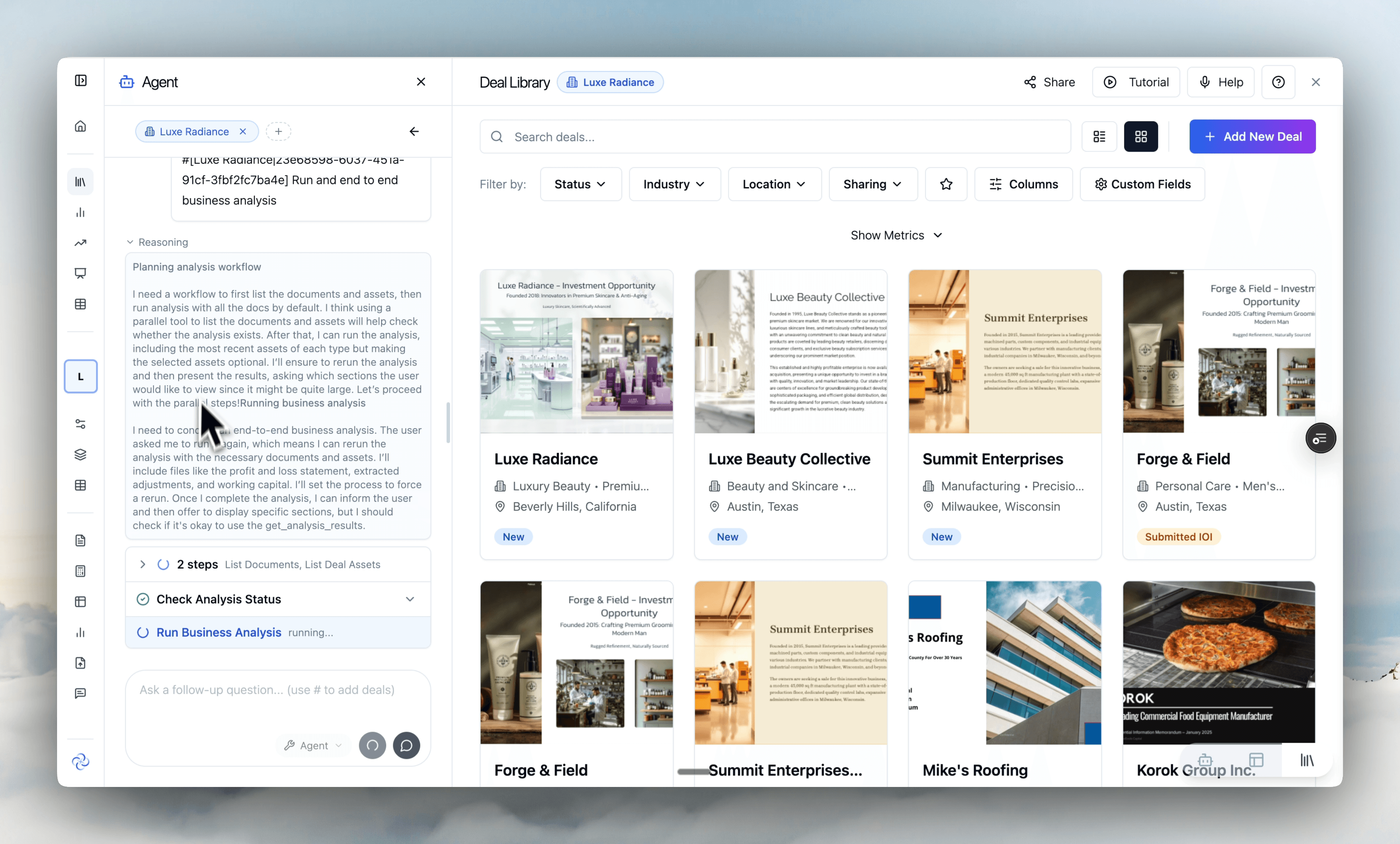
"DealSage Agent executing complete deal analysis workflow: business overview, financial audit, model build"
2. Cross-Portfolio Questions
"Show me all the beauty deals with more than $10M in revenue and compare their margin profiles."
The agent searches your entire pipeline, identifies matching deals, pulls the relevant metrics, and builds a comparison table. The table saves to Portfolio Tables for you to review and reference later.
This is the kind of question that used to require manually opening each deal, finding the data, copying it into a spreadsheet, and building the comparison yourself. Now you just ask.
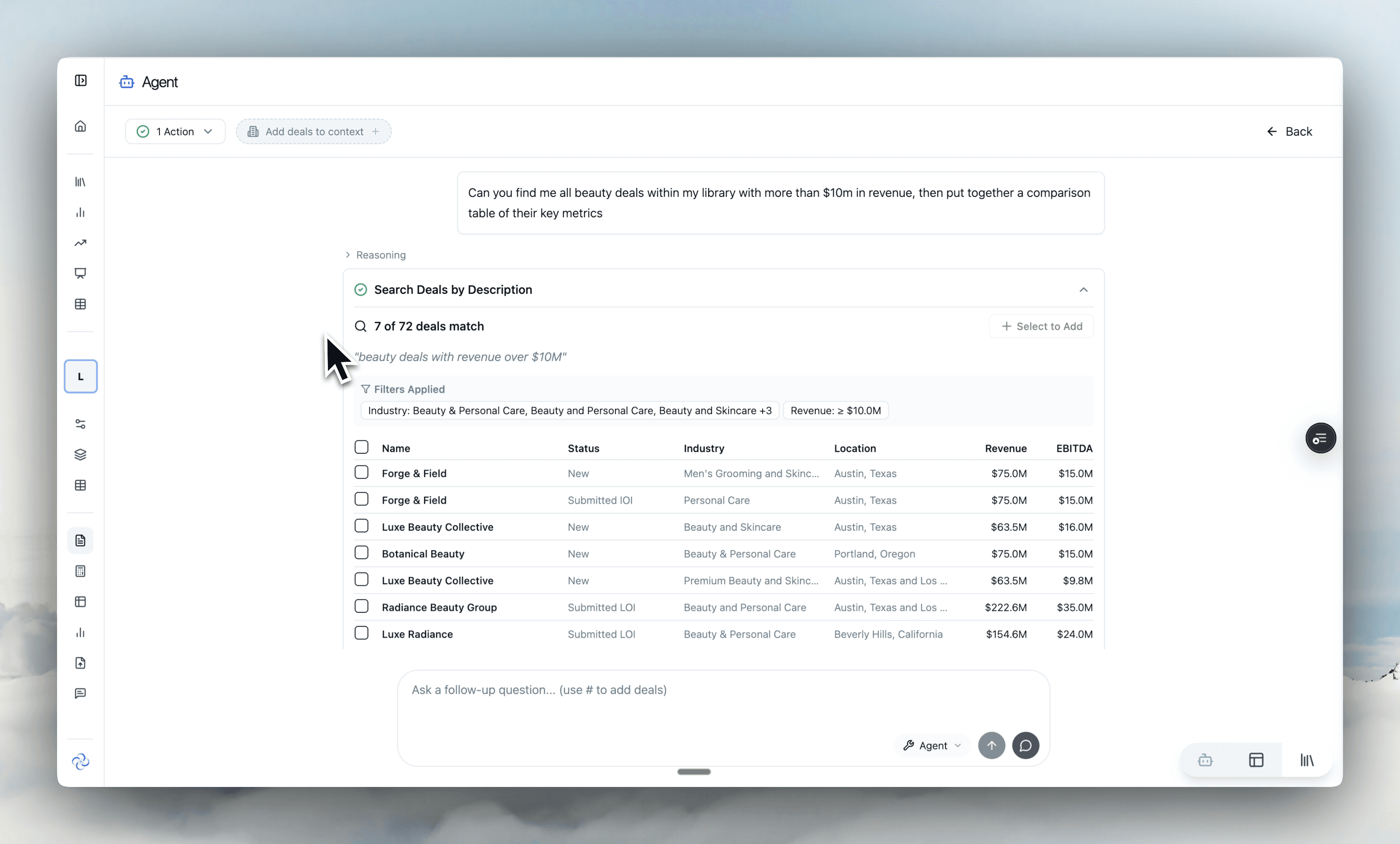
"Agent-generated comparison table showing margin profiles across beauty deals in portfolio"
3. Multi-Scenario Modeling
"Build five different model scenarios with entry multiples from 5x to 7x and show me the IRR comparison."
The agent runs each scenario, captures the outputs, and presents them in a summary table. You see the full range of outcomes without manually adjusting assumptions and recording results five times.
When you need to stress test quickly or present sensitivity analysis to IC, this is how you do it.
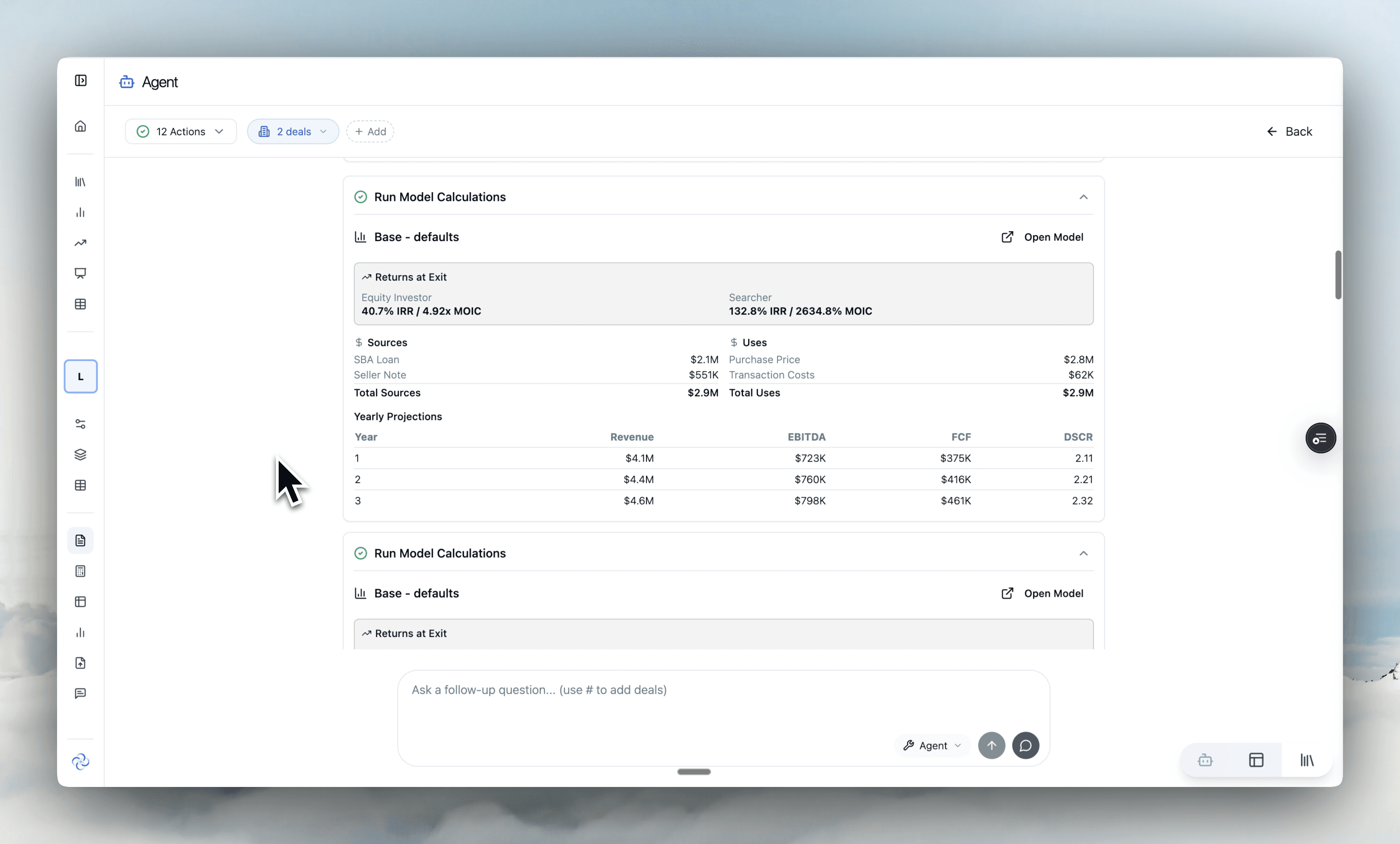
"Agent building multiple LBO scenarios and presenting IRR sensitivity analysis"
4. Pipeline Management and Documentation
"Update all deals in preliminary diligence that haven't had activity in 30 days to 'stale' status."
"Generate a memo for Luxe Radiance based on the analysis we've done."
The agent handles operational tasks that don't require judgment but do require time. Status updates, document generation, data entry. You focus on the decisions that matter.
Assistant vs. Agent: What's Different
Feature | Assistant Mode | Agent Mode |
|---|---|---|
Interaction | Ask question, get answer | Give goal, get completed work |
Workflow | You orchestrate each step | Agent orchestrates autonomously |
Scope | Single question/response | Multi-step workflows |
Output | Answers and explanations | Executed work product |
Time investment | You remain engaged throughout | You review at the end |
Best for | Quick questions, clarifications | Complex workflows, batch operations |
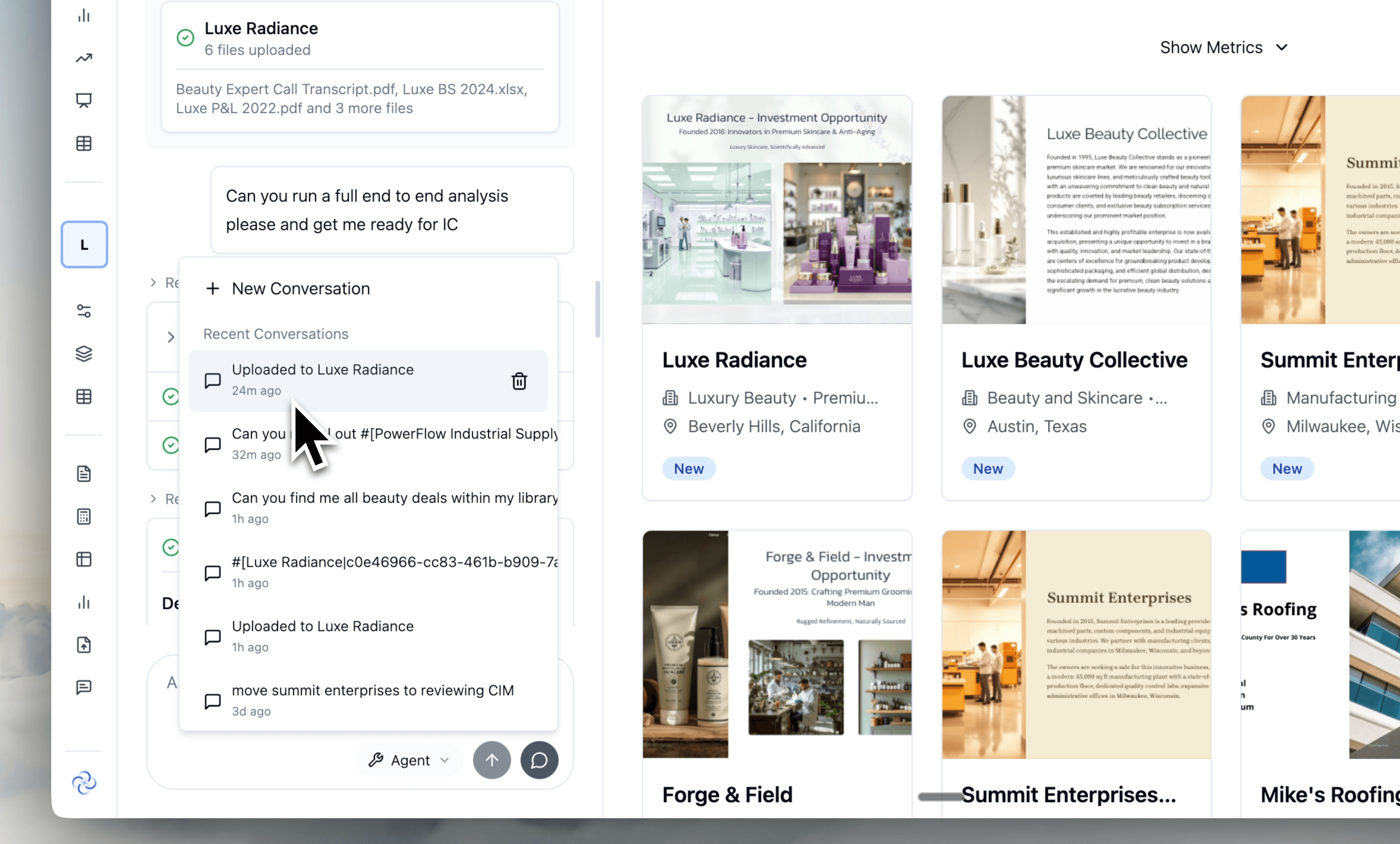
You can still use Assistant mode anytime. Select "Assistant" in the chat panel to return to the traditional one-for-one interaction. Use it for quick questions or when you want to stay hands-on.
Agent mode is selected by default because for most workflows, it's simply more powerful.
What's Changed in the Platform
A few things have moved around to accommodate agent-native workflows:
Agent is selected by default in the chat panel
Switch to Assistant mode anytime by selecting "Assistant"
Chat panel has moved to the left side of the screen
Tables the agent creates are saved to Portfolio Tables automatically
The chip at the bottom now controls three different panels in the platform
The agent has access to everything in DealSage. If there's a workflow you can do manually in the platform, the agent can do it for you.
Step-by-Step: Getting Started with EBITDA Auditing
1. Open the chat panel Click the chip at the bottom of the screen. The agent is selected by default.
2. Give it a goal Be specific about what you want. "Run an end-to-end analysis on Luxe Radiance" or "Compare all healthcare deals above $20M revenue."
3. Watch it reason The agent explains what it thinks it needs to do, then starts executing each step. You can see its thinking in real-time.
4. Review the output When it's done, you get the completed work. Tables save to Portfolio Tables. Analysis saves to the deal. Review, refine, ask follow-ups.
5. Iterate as needed Ask the agent to adjust, expand, or dive deeper on any section. It maintains context from what it's already done.
Pro Tips
Pro Tip #1: Be specific with your goals. "Analyse this deal" works, but "Run business analysis, audit the financials, and build a base case model for Luxe Radiance" gives the agent clearer direction and better results.
Pro Tip #2: Use the agent for cross-portfolio questions you'd never bother answering manually. "What's the average customer concentration across all my B2B services deals?" is trivial to ask but tedious to calculate yourself. The agent makes these questions free.
Pro Tip #3: The agent saves tables to Portfolio Tables automatically. After running comparisons or scenarios, check Portfolio Tables to find your outputs organised and ready for export or further analysis.
Why Agent-Native is the Future
The shift from assistant to agent is the shift from AI-assisted to AI-executed workflows.
Today, most AI tools help you work faster. You're still doing the work, just with better support. Agents change this equation. You define what needs to happen. The agent makes it happen.
But agents only work when the underlying infrastructure supports them. Structured data they can access. Defined tools they can use. Consistent workflows they can execute.
This is why we built DealSage as an agent-native platform from the ground up. Not chat bolted onto a document viewer. Not AI features added to legacy software. A platform designed for agents to operate on top of.
The bar to getting answers goes to zero. The work that used to take days happens in minutes. And this is just the beginning.
Frequently Asked Questions
Q: What's the difference between Agent mode and Assistant mode?
A: Assistant mode is traditional chat: you ask a question, you get an answer, one-for-one. Agent mode is goal-oriented: you tell the agent what you want accomplished, and it reasons through the steps and executes them autonomously. Use Assistant for quick questions and clarifications. Use Agent for multi-step workflows and complex tasks.
Q: Can the agent access all my deals and documents?
A: Yes. The agent has access to everything in DealSage: your deal library, all uploaded documents, Deal Tables, Deal Assets, models, and analyses. It can work across your entire portfolio, which is what makes cross-portfolio questions and comparisons possible.
Q: What if the agent does something I didn't want?
A: The agent shows its reasoning before executing, so you can see what it plans to do. All outputs are saved and reviewable. If something isn't right, you can ask the agent to adjust or redo the work. Nothing is permanent until you decide it is.
Q: Is this available on all plans?
A: The agent is available to all DealSage users. If you're on a current plan, you already have access. Just open the chat panel and start giving it goals.
Q: What are the best use cases for the agent?
A: The agent excels at multi-step workflows: end-to-end deal analysis, cross-portfolio comparisons, multi-scenario modeling, and batch operations like pipeline updates. For single quick questions, Assistant mode is often faster. For anything requiring multiple steps or touching multiple deals, Agent mode saves significant time.
Ready to Get Started?
The DealSage Agent is live for all users. Open the chat panel, give it a goal, and see what agent-native M&A workflows look like..
Questions about add-back validation or reconciliation workflows? Email harry@dealsage.io