
Refine, reference and create with your data
Learn how DealSage gives PE teams granular control over CIMs and financials.
Articles
Nov 6, 2025
The Problem with Disposable Chat
Every PE professional has tried using ChatGPT or Claude to analyze a CIM. You upload a PDF, ask questions, get answers. Then you close the chat and it's gone.
That's the fundamental limitation of chat-based AI—it's disposable. You can't reference it later, can't save your work as new assets, can't cite sources across multiple documents. It's a one-way conversation, not a work environment.
DealSage solves this with structured intelligence that gives you full flexibility over your deal data.
How DealSage's Assistant Works
Instead of one-off questions, you're working with the DealSage assistant—a chat interface where you have granular control over exactly what you're analyzing.
Here's how it works: Open the DealSage assistant and use the @ button to selectively reference specific tables, documents, or assets you've created. Need to analyze Q3 margins against customer concentration? Pull just those two tables into your context. Want to cross-reference management's revenue claims with actual financials? Bring both documents into the conversation with @.
This granular control means you're not drowning in irrelevant data—you're surgically cutting and refining exactly what you need for each insight.
"DealSage @ button interface showing selective document referencing for PE deal analysis"
Three Ways to Work with Your Data
1. Reference and Cite Across All Deal Documents
Pull a margin trend from the financials while drafting your IC memo. Cite directly to source documents and specific pages—all without switching between files. Use the @ button to bring in exactly what you need, when you need it.
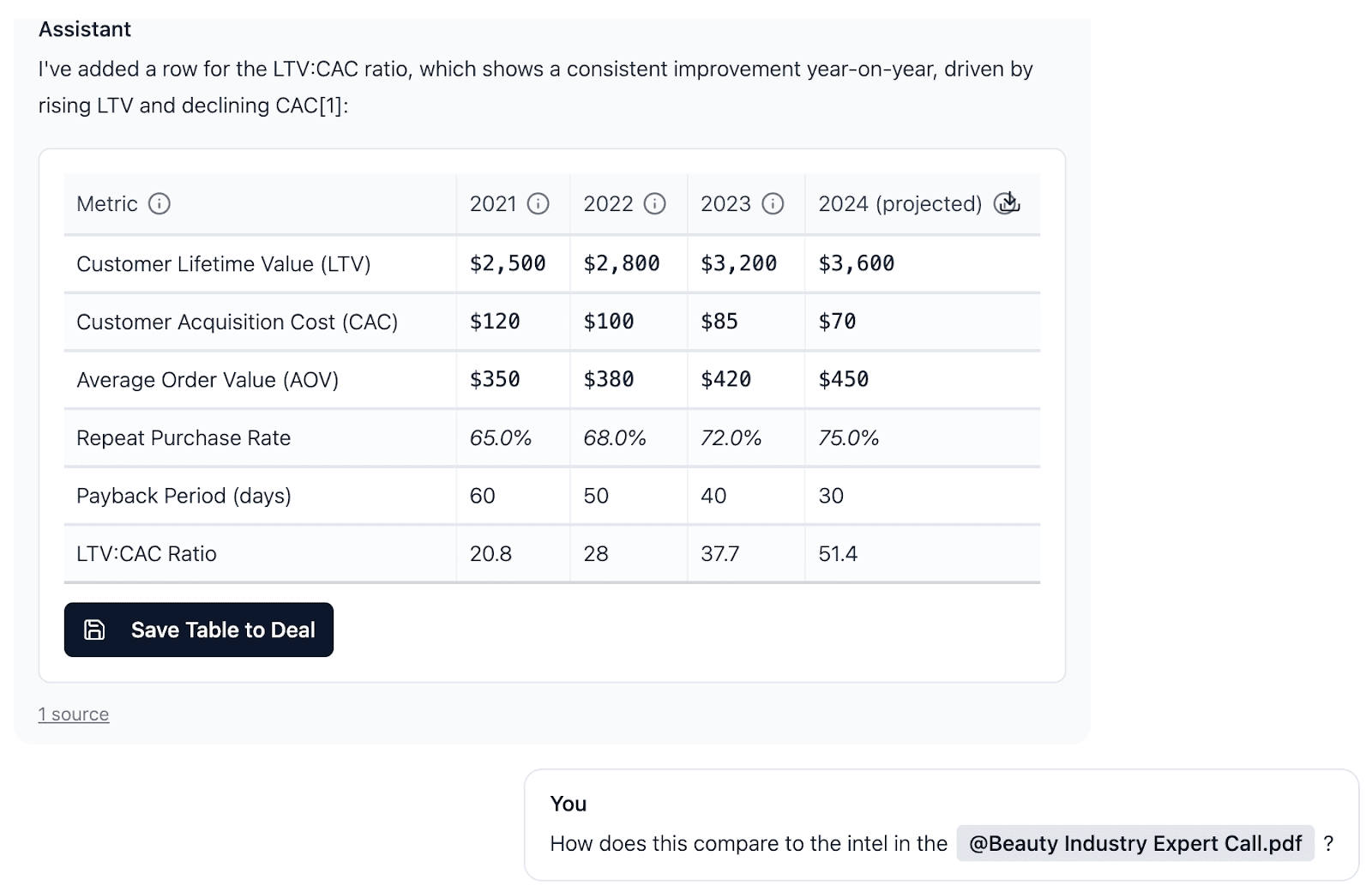
"Using DealSage @ button to reference data while refining memos"
2. Combine and Create New Tables You Can Chart
Extract data from multiple sources, combine them into new tables, chart those tables dynamically, and save them as permanent assets. Every table you create becomes part of your institutional knowledge—reusable across deals.
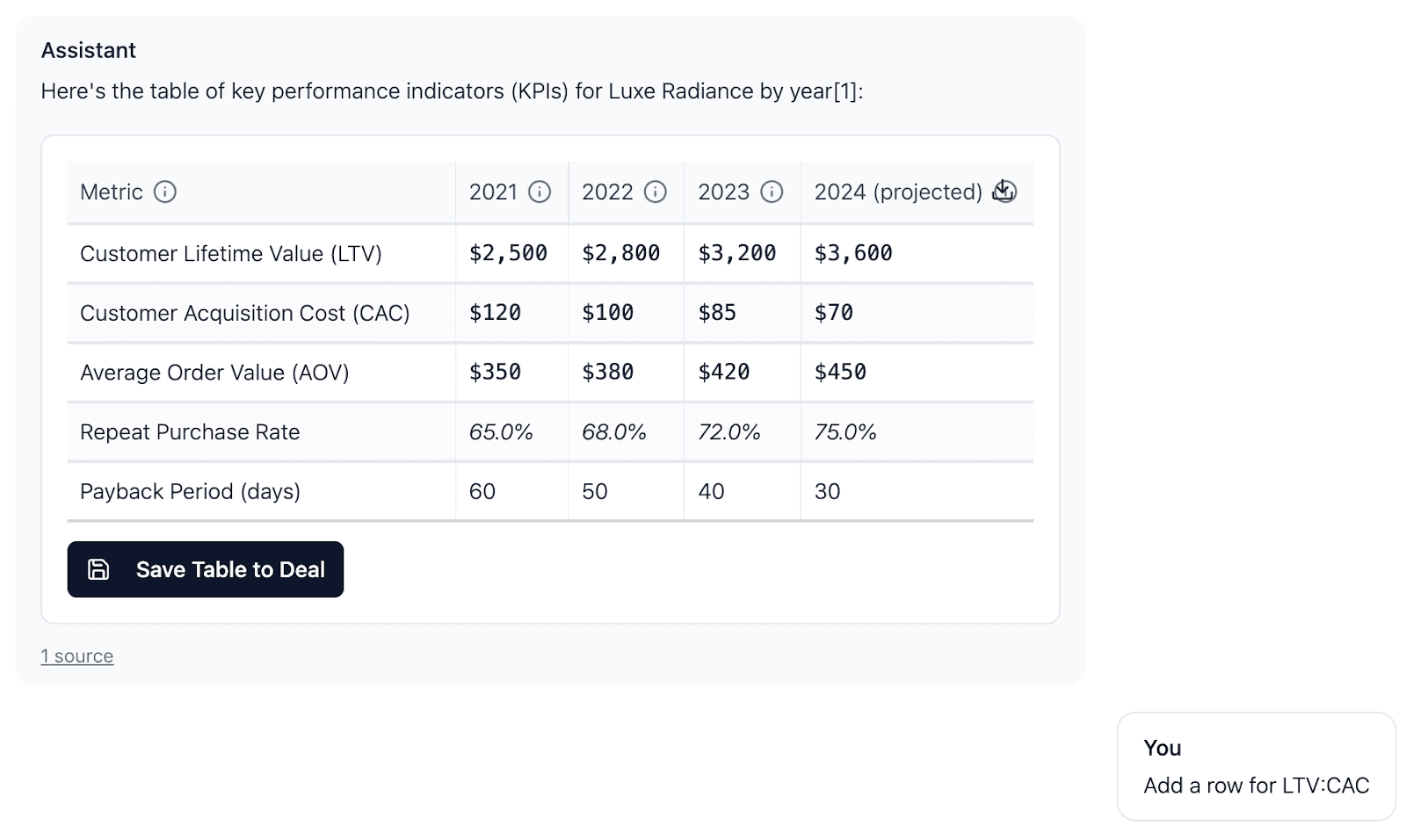
"Creating custom tables in DealSage from multiple deal documents"
3. Create with Full Context
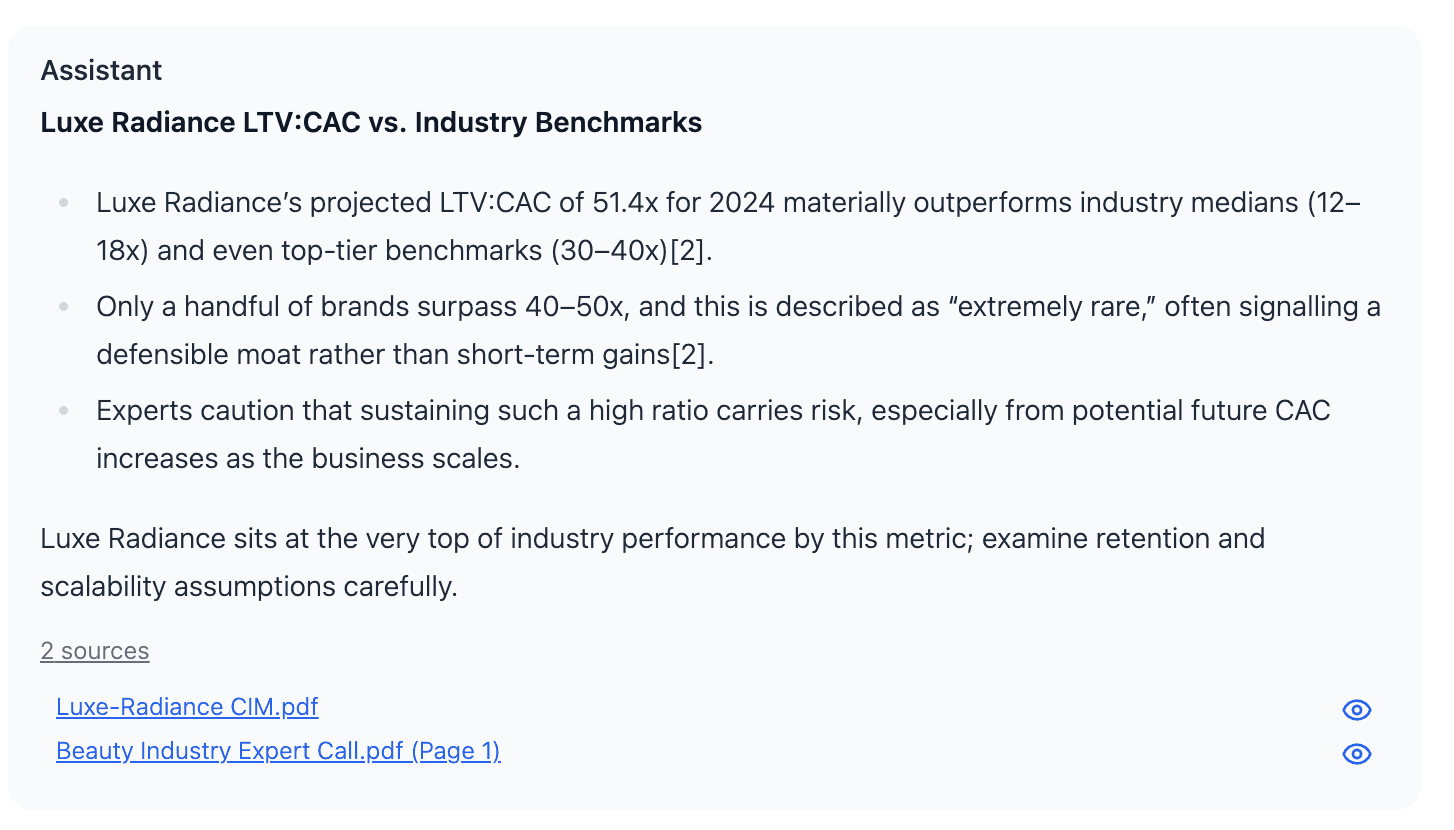
Writing a memo? Use @ to selectively reference the benchmarks, management quotes, and validated financials that matter—then trace every claim back to its origin. Your analysis is sourced, validated, and auditable.
"ISourced data and automatic citations"
Why This Matters: Time Savings That Compound
The average PE professional spends 40% of their time on data manipulation—copying figures from PDFs, rebuilding models, reconciling inconsistencies. When you have granular control over structured data, that time drops to minutes.
One customer told us: "I used to spend Sunday nights prepping for Monday IC meetings. Now I generate sourced memos in 20 minutes."
That's the difference between disposable chat and persistent intelligence with precision control.
Chat Tools vs. DealSage: What's Different?
Feature | Chat Tools (ChatGPT/Claude) | DealSage |
Data persistence | ❌ Disappears when chat closes | ✅ Permanent structured database |
Selective referencing | ❌ All or nothing context | ✅ Granular control via @ button |
Save new assets | ❌ Can't save tables/charts | ✅ Create and save reusable tables |
Source citation | ❌ No automatic sourcing | ✅ Every claim traced to source |
Team collaboration | ❌ Not designed for sharing | ✅ Built for team workflows |
Institutional memory | ❌ Starts from zero each time | ✅ Compounds with every deal |
Step-by-Step: Getting Started
Upload your deal documents
CIMs, profit and loss statements, expert call transcripts—whatever you have.DealSage structures everything
Into queryable, citable data that's permanently accessible.Open the assistant
Use the @ button to reference specific tables, documents, or assets you've created.Get insights
With full control over what's in your context window—combine data, create charts, generate memos.Export or use built-in workflows
Take your structured data to Excel/PowerPoint, or work entirely within DealSage
Your data becomes a living workspace with surgical precision, not a static PDF collection.
Pro Tips
Pro Tip #1:
Start by uploading your CIM and financials first. Once structured, you can reference these with @ in every subsequent conversation without re-uploading.
Pro Tip #2:
Use the @ button to bring in just 2-3 assets at a time for focused analysis. This keeps your context clean and your insights sharp.
Pro Tip #3:
Create reusable table templates for common analyses (revenue breakdown, margin analysis, customer concentration) that you can apply to every deal with @.
What This Means for Your Deal Process
This is what "AI-native intelligence platform" means versus "AI-powered chat tool." Chat gives you answers. DealSage gives you a work environment where you control the context, refine the data, and build analysis that compounds.
Every deal you process makes your next evaluation faster. Every table you create becomes reusable. Every insight you generate is traceable and auditable.
Frequently Asked Questions
Q: How is DealSage different from using ChatGPT for deal analysis?
A: ChatGPT provides one-time answers that disappear when you close the chat. DealSage structures your deal data into a persistent, queryable database where you can selectively reference specific tables and documents with the @ button. You can create new tables, save them, and reuse them across deals. Your analysis compounds over time instead of starting from zero each time.
Q: Can I use DealSage with my existing workflow?
A: Yes. DealSage exports to Excel, PowerPoint, and PDF so you can integrate with whatever tools you already use. Or you can work entirely within DealSage's built-in workflows—your choice.
Q: What types of documents does DealSage work with?
A: CIMs, financial statements (P&Ls, balance sheets, cash flow), management presentations, expert call transcripts, data room files, LOIs, NDAs, and any other deal documents. If it's a PDF, Word doc, or spreadsheet, DealSage can structure it.
Ready to Get Started?
Schedule a call with sales to see how DealSage transforms your deal process.
Questions about how this works with your workflow? Email harry@dealsage.io