
Output, export and generate memos
DealSage generates investment memos and exports analysis to Excel with preserved formulas.
Articles
Nov 10, 2025

The Problem: Rewriting the Same Memo Every Single Deal
You've spent the last three weeks analyzing a deal. You've reconciled the financials, built your EBITDA bridge, scored it against your rubric, benchmarked it against your portfolio, and validated all the add-backs.
Now you need to present to IC. So you're opening a blank Word document and starting from scratch: executive summary, investment thesis, financial analysis, comparable deals, risk factors, key assumptions. You're copy-pasting numbers from your Excel model, screenshots from your analysis, pulling quotes from expert calls.
Four hours later, you have a 12-page memo that you'll never use again. Next deal, you'll start from scratch again—different template, different structure, no consistency across your deal team.
This is the manual documentation work that doesn't add value but consumes hours of your week.
DealSage solves this by generating structured investment memos from your analysis and exporting all your work to Excel with formulas preserved—turning 4 hours of memo writing into 30 minutes of review and customization.
How Outputs, Exports and Memo Generation Work
After you've completed your analysis in DealSage—scoring rubrics, financial reconciliation, benchmarking, due diligence notes—you can generate outputs in multiple formats for different purposes.
Here's what happens: Use DealSage's memo builder to create your presentation in a flexible grid format. Select what inputs you want to include: tables, charts, text blocks. Pull in your business analysis and scoring results. Choose from templates, edit and refine your layout, create multiple slides, and export to PowerPoint.
Or export your financial models to Excel with all formulas and linkages preserved for integration with your existing underwriting workflows.
Everything is flexible—add sections, reorder content, customize layouts based on deal type. Use the @ button to reference any part of your analysis, ensuring your narrative matches your numbers automatically.
"Building investment memo in DealSage grid builder with tables, charts, and business analysis, then exporting to PowerPoint"
Four Ways Automated Outputs Save Time and Improve Consistency
1. Build Memos Visually with Flexible Grid Layout
Use the memo builder's grid format to construct your IC presentation. Add tables from your financial analysis, charts from your benchmarking, text blocks for commentary. Pull in business analysis and scoring results directly. Arrange everything visually—drag, drop, resize. Choose from templates or build from scratch, then export to PowerPoint with all formatting preserved.
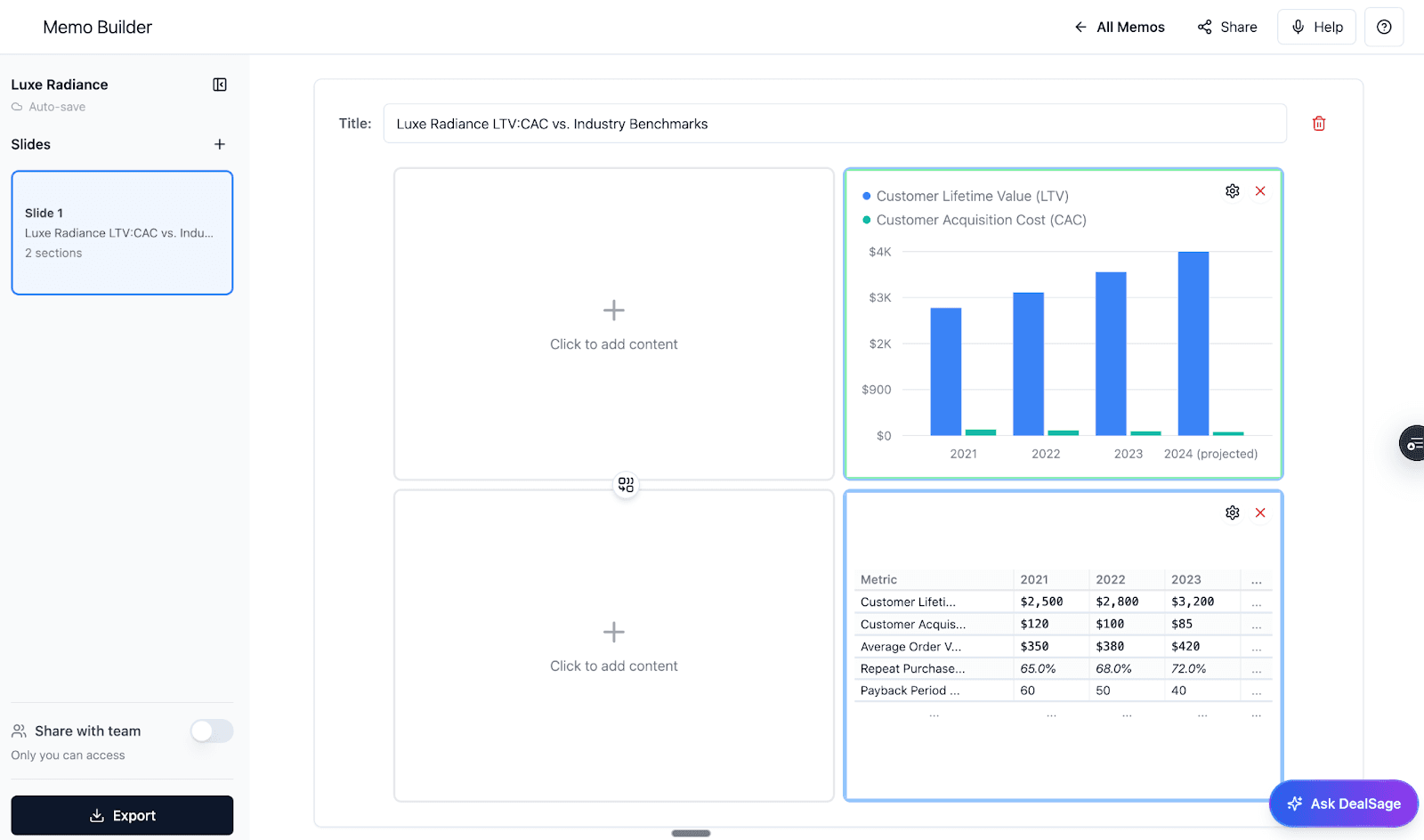
[IMAGE: Screenshot showing memo builder grid interface with tables, charts, and text] Image alt text: "DealSage memo builder showing grid layout with tables, charts, and business analysis for PowerPoint export"
2. Export Financial Models to Excel with Formulas Preserved
Your EBITDA reconciliation, financial projections, sensitivity analyses—all exportable to Excel with formulas and cell linkages intact. No copy-paste. No rebuilding formulas. Just working Excel models that plug into your existing underwriting process.
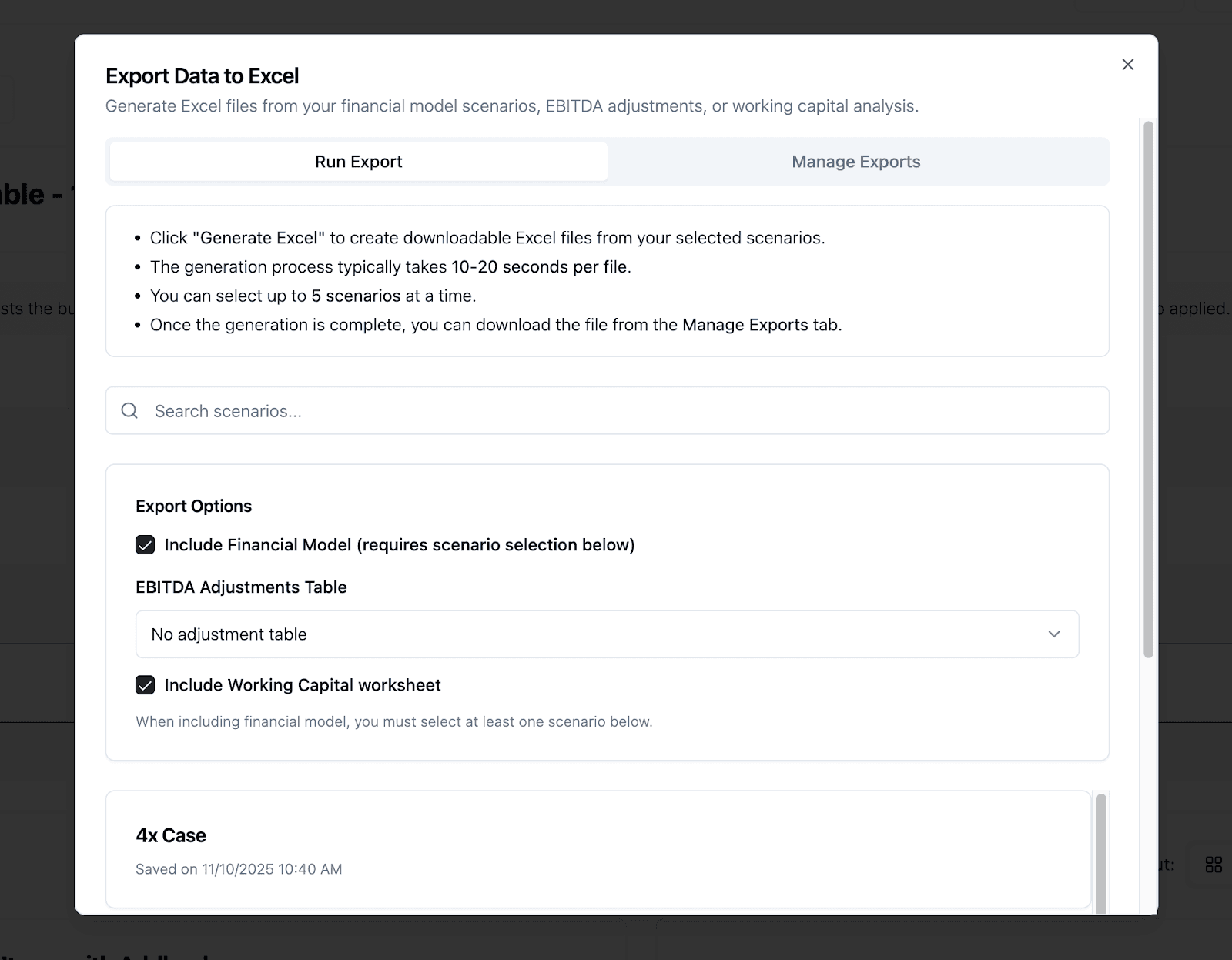
[IMAGE: Screenshot showing Excel export with preserved formulas] Image alt text: "Excel export from DealSage showing EBITDA reconciliation with preserved formulas and linkages"
3. Use Templates and Create Multiple Slides
Start with DealSage templates for common memo structures, then edit and refine to match your firm's style. Create multiple slides for different sections: executive summary slide, financial analysis slide, benchmark comparison slide. Save your customized layouts for reuse across similar deals. Consistency makes IC review faster and more effective.
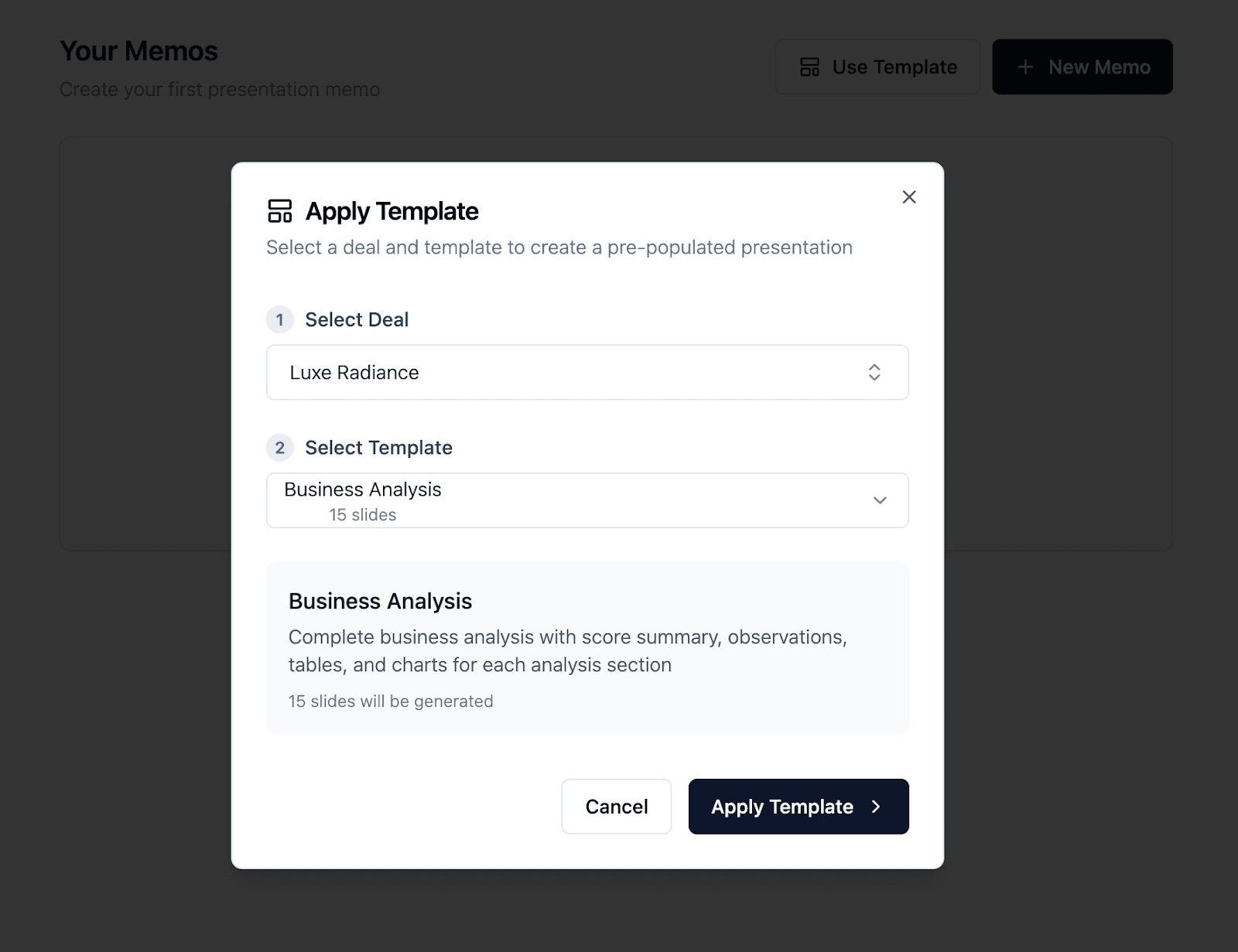
"Template library and multi-slide builder in DealSage for creating consistent PowerPoint presentations"
Why This Matters: Documentation That Doesn't Slow You Down
One lower-middle-market PE firm was spending 4-6 hours per deal on IC memo creation. Junior analysts were rebuilding financial exhibits, copying numbers from Excel, reformatting tables, ensuring consistency with previous memos.
After implementing DealSage's automated outputs, they cut memo creation to 30-45 minutes. Generate the structured memo, review for accuracy, add deal-specific commentary, export to Word, done.
That's 3.5-5 hours back per deal. At 50 deals per year, that's 175-250 hours—or 4-6 full weeks—returned to actual deal work instead of formatting documents.
But the bigger impact is consistency. Every memo follows the same structure. Every financial exhibit uses the same format. Partners know where to find the information they need. IC reviews are faster because the format is predictable.
This isn't just about efficiency—it's about building institutional quality in your deal documentation.
Manual Memo Building vs. DealSage Automation: What's Different?
Feature | Manual PowerPoint Creation | DealSage Memo Builder |
Time to create | 4-6 hours per deal | 30-45 minutes build and customize |
Layout control | Manual slide-by-slide creation | Flexible grid format with drag-and-drop |
Content sourcing | Copy-paste from multiple files | Pull tables, charts, analysis directly |
Templates | Rebuild from scratch or find old deck | Template library with edit and save |
Multi-slide creation | One slide at a time | Build multiple slides, reorder easily |
Formula preservation in Excel | Lost in copy-paste | Preserved in Excel exports |
Step-by-Step: Getting Started with Outputs and Exports
Complete your analysis in DealSage
Scoring rubrics, EBITDA reconciliation, benchmarking, due diligence notes—all the work feeds into outputs.Open memo builder and select template
Choose from DealSage templates or start with blank grid layout.Add inputs to your grid
Select tables, charts, text blocks—arrange them visually in grid format.Pull in business analysis and scores
Add your scoring results, business analysis summaries, benchmark comparisons.Create multiple slides and customize
Build slides for different sections, edit layouts, refine formatting, save your customized template.Export to PowerPoint or Excel
Memos export to PowerPoint with formatting preserved, financial models export to Excel with formulas intact.
Your presentation is built from your analysis, not from scratch.
Pro Tips
Pro Tip #1:
Build your firm's standard memo template in DealSage once, then every deal uses that structure. Include sections for executive summary, investment thesis, financial analysis, benchmark comparison, risk factors, and key assumptions. This ensures consistency across analysts and makes IC reviews more efficient.
Pro Tip #2:
Use the @ button when adding custom commentary to your memo sections. This creates dynamic references to your analysis, making it easy to pull in specific data points or context without manual copy-paste. While you'll need to rebuild the memo if your underlying analysis changes, the @ button makes finding and referencing the right information faster.
Pro Tip #3:
Export financial models early in your process, not just at IC stage. Use Excel exports to validate your DealSage analysis matches your existing underwriting model format. This catches any discrepancies before IC presentation and ensures seamless integration with your workflows.
What This Means for Your Deal Documentation Process
Investment memos serve two purposes: communicating your analysis to IC, and creating permanent documentation of your diligence work. Both require accuracy, consistency, and completeness.
DealSage's automated outputs ensure your memos are built from your actual analysis, not manually reconstructed from memory and scattered Excel files. The scoring breakdown in your memo matches your actual rubric scores. The EBITDA reconciliation shows the same numbers you used in your model. Benchmark data reflects your actual deal library.
This level of integration prevents the common problem where memos tell one story and financial models tell another because they were built separately.
After generating 10-15 memos with DealSage, you'll have:
Consistent documentation across your entire deal pipeline
3-5 hours back per deal for actual analysis work
Templates and saved layouts that speed up future memo creation
Financial exports that integrate seamlessly with existing workflows
Institutional knowledge captured in structured, searchable formats
Most firms find that memo generation ROI compounds over time—the first few deals save hours, but by deal 20-30, you're spending almost no time on formatting and structure, just on deal-specific insights.
Frequently Asked Questions
Q: What can I customize in the memo builder?
A: You have full control over layout and content. In the grid builder, add, remove, or rearrange any inputs: tables from your financial analysis, charts from benchmarking, text blocks for commentary, business analysis summaries, scoring results. Create multiple slides with different layouts. Start with DealSage templates and edit them to match your firm's style, then save your customized versions for reuse. Everything is drag-and-drop flexible—arrange content visually, resize elements, create the exact presentation you need.
Q: Can exported Excel files integrate with my existing financial models?
A: Yes. DealSage exports preserve all formulas, cell references, and formatting. You can copy sheets from DealSage exports directly into your firm's standard model template, or use DealSage exports as standalone models. The reconciliation bridges, sensitivity tables, and financial projections all maintain their Excel formula structure, so they work exactly like native Excel models.
Q: What happens to my memo if I update my analysis after building it?
A: You would need to rebuild the memo to incorporate updated analysis. If you change your EBITDA reconciliation or update scoring after management meetings, you'd return to the memo builder and reconstruct with the new data. The grid format makes rebuilding faster than starting from scratch—you can use your saved template and just update the specific inputs that changed.
Q: What if I want my memo output to match my firm's specific style and formatting?
A: Speak with the DealSage team. We have the capabilities to build you custom outputs that exactly fit your IC memo style and format. Whether you have specific branding requirements, unique layout preferences, or particular section structures your firm uses, we can create custom templates that match your existing standards. This ensures your DealSage outputs integrate seamlessly with your firm's documentation approach.
Ready to Get Started?
Schedule a call with sales to see how automated outputs transform your deal documentation process.
Questions about memo templates or Excel export compatibility? Email harry@dealsage.io