

Audit financials and calculate profitability
DealSage audits seller add-backs and estimates EBITDA from raw financials.
Articles
Nov 27, 2025
The Problem: Building EBITDA Reconciliations Line by Line
You're evaluating a services business. The CIM shows $7.2M in adjusted EBITDA with a long list of add-backs: $950K in "excess owner compensation," $620K in "one-time facility expenses," $380K in "legal settlements."
Now you need to build the bridge from net income to adjusted EBITDA. Which add-backs are legitimate? Which are aggressive? You're going through the P&L line by line, categorizing expenses as operating vs. non-operating, identifying one-time items, deciding which adjustments to accept at 100%, which at 50%, which to reject entirely.
Six hours later, you have a reconciliation—but you're still not confident. Is that owner compensation adjustment actually market rate? Are those facility expenses truly one-time? Should you add back that entire legal settlement or just a portion?
This manual reconciliation work is how deals get overpriced—aggressive add-backs get accepted without proper scrutiny, and you're modeling on seller-friendly EBITDA.
DealSage solves this with dual-purpose audit functionality: validate seller add-backs from CIMs or estimate EBITDA from raw P&L statements, with conservative-to-aggressive recommendations and line-by-line categorization.
How EBITDA Auditing and Reconciliation Works
DealSage's audit workflow serves two purposes: auditing seller-presented add-backs from CIMs, or building EBITDA estimates from raw Deal Assets when you have profit and loss statements but no broker reconciliation.
Here's what happens: Upload your CIM with seller add-backs, or reference your Deal Assets (raw P&L statements). DealSage analyzes every line item and categorizes them:
Standard add-backs (depreciation, interest, taxes)
Operating expenses (core business costs)
Non-operating expenses (items that should be added back)
Non-operating income (items that should be removed)
One-time adjustments (truly non-recurring items)
Not an adjustment (operating costs that shouldn't be added back)
You build your reconciliation from net income to adjusted EBITDA by moving items from the left side to the right side. DealSage provides recommendations from conservative to aggressive—click the "i" tooltip next to any item to see the explanation for why it's categorized that way.
Adjust add-back percentages (50%, 25%, 100%), layer in your own proforma adjustments (management hires, buyer cost savings), and export the entire reconciliation to Excel or plug into modeling workflows.
"Building net income to adjusted EBITDA reconciliation in DealSage with conservative and aggressive add-back recommendations"
Four Ways EBITDA Auditing Prevents Overpaying
1. Audit Seller Add-Backs from CIMs
Upload a CIM with broker-presented add-backs. DealSage evaluates each adjustment and flags whether it's legitimate, aggressive, or questionable. See conservative vs. aggressive EBITDA estimates before you build your model—understand the range of plausible valuations.
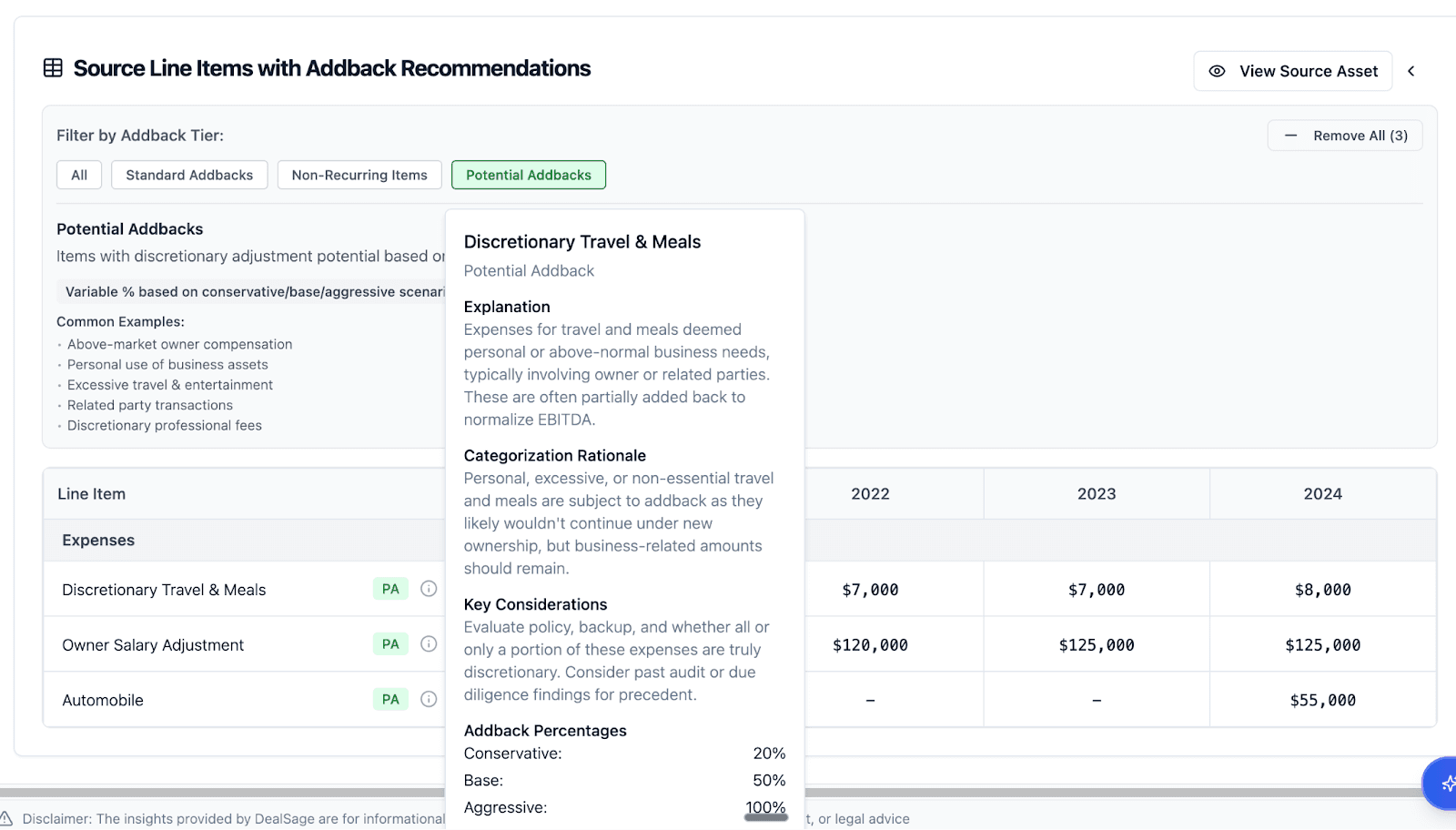
"Seller add-back audit in DealSage showing conservative and aggressive EBITDA recommendations"
2. Estimate EBITDA from Raw Financials
Working with raw P&L statements and no broker reconciliation? DealSage analyzes the financials line by line, identifies potential add-backs, categorizes operating vs. non-operating expenses, and builds an EBITDA estimate from scratch. This is particularly valuable for proprietary deals where you're getting unpackaged financials.
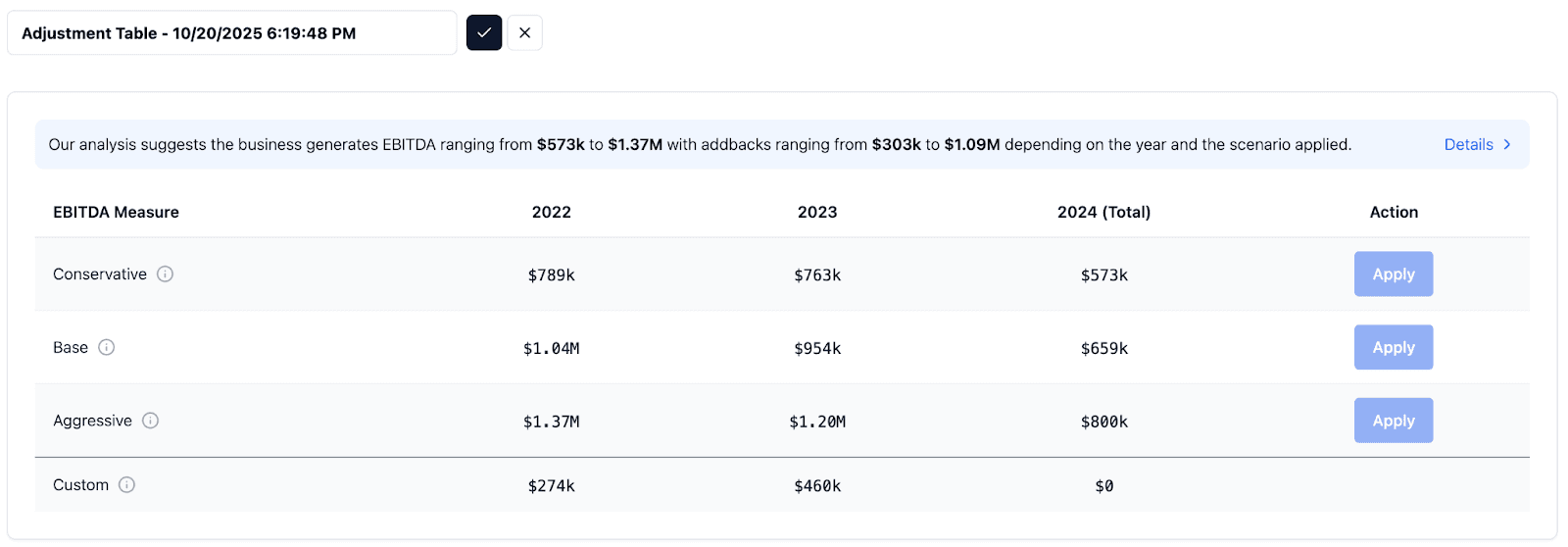
"Line-by-line P&L categorization in DealSage showing operating vs. non-operating expense classification"
3. Build Custom Reconciliation with Transparency
Start from net income, move items from left to right to build your adjusted EBITDA bridge. Click "i" tooltips to see explanations for each categorization. Adjust add-back percentages—take 100% of that legal settlement, or only 50% if you're not confident it's non-recurring. Layer in your own proforma adjustments for buyer-specific cost structure.
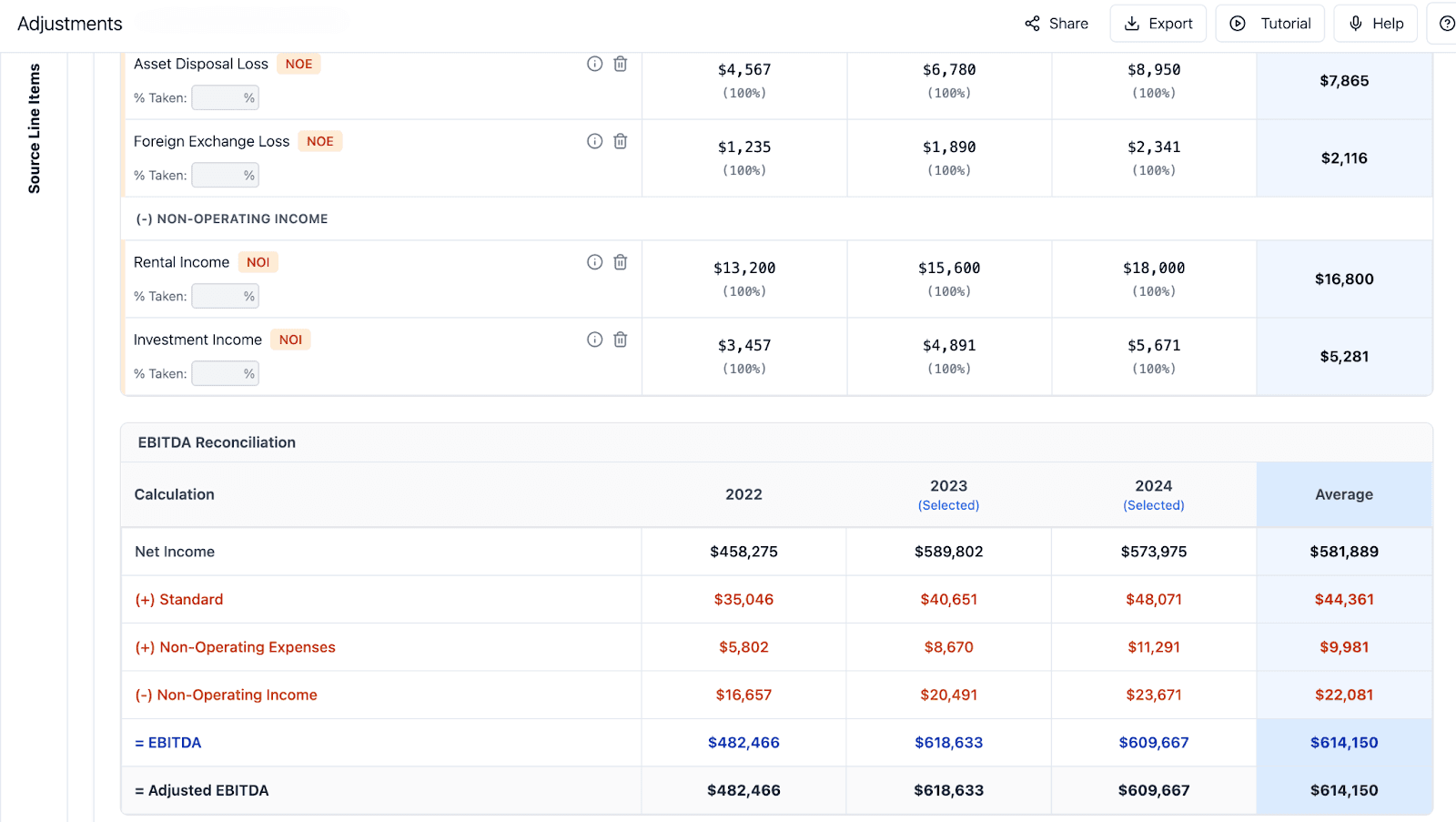
"EBITDA reconciliation builder in DealSage showing net income to adjusted EBITDA bridge with add-backs"
4. Export to Excel or Modeling Workflows
Once you've built your reconciliation, export to a linked Excel model with all formulas preserved, or plug directly into DealSage's modeling workflows. Your EBITDA bridge, complete with audit trail and percentage adjustments, flows directly into your underwriting model.
Why This Matters: The Cost of Aggressive Add-Backs
One search fund investor was evaluating an $8.5M adjusted EBITDA manufacturing business. Management's CIM showed extensive add-backs, including $1.3M in "excess owner compensation," $850K in "redundant facility costs," and $620K in "one-time consulting fees."
Using DealSage's audit workflow, he built three scenarios:
Aggressive case: Accept all seller add-backs at 100% = $8.5M EBITDA
Moderate case: Accept some at 50-75%, question others = $6.8M EBITDA
Conservative case: Reject questionable add-backs = $5.8M EBITDA
The conservative-to-aggressive range was $2.7M—nearly a third of the seller's claimed EBITDA. At a 6x multiple, that's a $16.2M valuation range.
By presenting all three scenarios to his IC with clear audit logic for each adjustment, he negotiated based on the moderate case ($6.8M) rather than accepting the seller's aggressive case. That saved $10.2M in purchase price.
This is why systematic EBITDA reconciliation matters—you're not guessing at which add-backs to accept, you're building defensible scenarios with clear audit trails.
Manual Excel Reconciliation vs. DealSage Automation: What's Different?
Feature | Manual Excel Reconciliation | DealSage EBITDA Auditing |
Time to reconcile | 6+ hours building bridge | 1 hour to review and customize |
Add-back categorization | Manual line-by-line review | Automatic categorization with explanations |
Conservative vs. aggressive | Build multiple versions manually | Toggle between scenarios instantly |
Audit transparency | Manual notes | Click eye icon for explanation on every item |
Percentage adjustments | Manual formula building | Adjust 100% / 75% / 50% / 25% with one click |
Proforma adjustments | Separate worksheet | Built into reconciliation workflow |
Export | Copy/paste | Linked Excel or direct to modeling |
Step-by-Step: Getting Started with EBITDA Auditing
Upload CIM with add-backs OR reference your Deal Assets
Dual-purpose: audit seller add-backs or estimate EBITDA from raw P&LsReview automatic categorization
See how DealSage categorized each line item: operating, non-operating, one-time, standard add-backsBuild your reconciliation
Move items from left to right to construct net income to adjusted EBITDA bridgeReview conservative to aggressive scenarios
Click "i" tooltips to see explanation for each categorization, adjust percentages (any percentage you want—not limited to 25% increments)Layer in proforma adjustments
Add your own buyer-specific adjustments (management hires, cost savings, synergies)Export to Excel or modeling workflow
Linked export preserves all formulas and audit trails
You now have a defensible EBITDA reconciliation with clear logic for every adjustment.
Pro Tips
Pro Tip #1:
You can build multiple different cases, scenarios, and versions within DealSage. Create a conservative version, a moderate version, and an aggressive version—each saved separately. This gives you maximum flexibility: present all three to IC, use conservative for initial underwriting, switch to moderate if seller pushes back on valuation, or reference aggressive case to understand upside potential.
Pro Tip #2:
Use the "i" tooltip explanations to build your IC narrative. Instead of just showing numbers, you can explain: "We accepted 50% of the facility cost add-back because similar expenses appeared in 2 of the last 3 years—partially recurring." This level of transparency strengthens your credibility with partners.
Pro Tip #3:
Layer in proforma adjustments separately from seller add-backs. Keep them in distinct sections of your reconciliation so partners can see: (1) validated seller EBITDA, (2) buyer-specific improvements. This prevents over-optimistic modeling where every possible adjustment gets added back.
What This Means for Your Underwriting Process
EBITDA reconciliation is where deals get made or broken. Accept aggressive add-backs and you overpay. Be too conservative and you might pass on a good deal. The key is transparency—understanding exactly which adjustments you're accepting and why.
DealSage's audit workflow creates that transparency. Every add-back has logic. Every categorization has an explanation. Conservative vs. aggressive isn't a guess—it's a systematic framework.
After auditing 10-15 deals with DealSage, you'll have:
Consistent methodology for evaluating add-backs across all opportunities
Clear documentation for IC on why you accepted or rejected adjustments
Negotiating leverage with sellers when you can show specific line items that don't hold up
Faster deal execution because EBITDA reconciliation is done in hours, not days
Most lower-middle-market deals have at least $200K-500K in questionable add-backs. Catching even half of these overstatements prevents millions in overpayment across your portfolio.
Frequently Asked Questions
Q: How does DealSage decide which add-backs are legitimate?
A: DealSage applies logic-based categorization: identifying standard add-backs (D&A, interest, taxes), flagging items that appear in multiple years as potentially recurring, comparing owner compensation to market benchmarks, and categorizing operating vs. non-operating expenses. Each categorization includes an explanation you can access via "i" tooltip. You always have final judgment—DealSage provides recommendations from conservative to aggressive, and you choose which scenario to use.
Q: Can I adjust the add-back percentages?
A: Yes. For any add-back, you can enter whatever percentage you want—you're not limited to 25% increments like 100%, 75%, 50%, 25%. Want to accept 63% of an add-back? Just type it in. This is useful when an expense is partially recurring—you might accept 40% of a "one-time" facility repair if similar costs appear occasionally but not every year. The reconciliation updates automatically when you adjust percentages.
Q: What's the difference between auditing seller add-backs vs. estimating from raw P&Ls?
A: Both use the same workflow, just different starting points. When auditing seller add-backs, you're validating adjustments already presented in a CIM—you'll see an "As Presented" row showing the numbers as they appear in the CIM, which you can compare against DealSage's conservative to aggressive recommendations. When estimating from raw P&Ls (Deal Assets), DealSage analyzes line items and identifies potential add-backs you should consider—useful for proprietary deals where there's no broker reconciliation. Either way, you build the final net income to adjusted EBITDA bridge.
Ready to Get Started?
Schedule a call with sales to see how EBITDA auditing transforms your quality of earnings process.
Questions about add-back validation or reconciliation workflows? Email harry@dealsage.io