

Combine, reconcile and validate financials
DealSage Deal assets automatically reconciles P&Ls whether they're PDFs, Excels, Monthly, or Annual.
Articles
Nov 24, 2025

The Nightmare of Proprietary Deal Financials
You're evaluating a proprietary HVAC deal. The owner sends you their financials: messy QuickBooks exports, some monthly P&Ls, some annual summaries, a mix of PDFs and Excel files with inconsistent formatting.
Now you need to combine 3 years of monthly statements into annual figures. Revenue shows up as "Sales" in 2022, "Revenue" in 2023, and "Income" in 2024. COGS line items don't match across years. Some months have subtotals, others don't. Excel formulas are broken. Numbers that should reconcile don't add up.
So you spend 5+ hours manually building a master P&L, copying line items, reconciling categories, validating subtotals, and hoping you didn't miss a duplicate entry or miscategorize an expense.
This is the manual grunt work that kills momentum on proprietary deals—and creates the risk of building your model on wrong financials.
DealSage Deal Assets solve this by automatically combining, reconciling, and validating P&L statements across any format or time period.
How Deal Assets Work for P&L Reconciliation
Deal Assets are designed specifically for complex financial data that requires rigorous validation. This is particularly powerful for proprietary deals where you're getting raw financials directly from business owners.
Here's what happens: Upload all your P&L statements—monthly, quarterly, annual, whatever mix of PDFs and Excel files you have. DealSage creates Deal Assets from each statement and automatically reconciles line items across periods.
Revenue from January 2023 maps to revenue from February 2023 even if they're labeled differently. COGS items are consolidated even if formatting varies. The system validates that subtotals sum correctly, that revenue minus expenses equals the reported totals, and flags any duplicates or gaps.
You can view source documents (including Excel files) live in the app, do side-by-side comparisons, and export a clean, reconciled P&L ready for modeling or further analysis.
"DealSage Deal Assets combining and reconciling multiple P&L statements from QuickBooks exports and Excel files"
Four Ways Deal Assets Transform P&L Reconciliation
1. Combine P&Ls Across Any Format or Time Period
Upload monthly P&Ls for 3 years. Upload annual summaries. Upload QuickBooks exports, Excel spreadsheets, PDFs—whatever you have. Deal Assets extract and structure every statement, then intelligently map line items across periods even when labels and formatting differ.
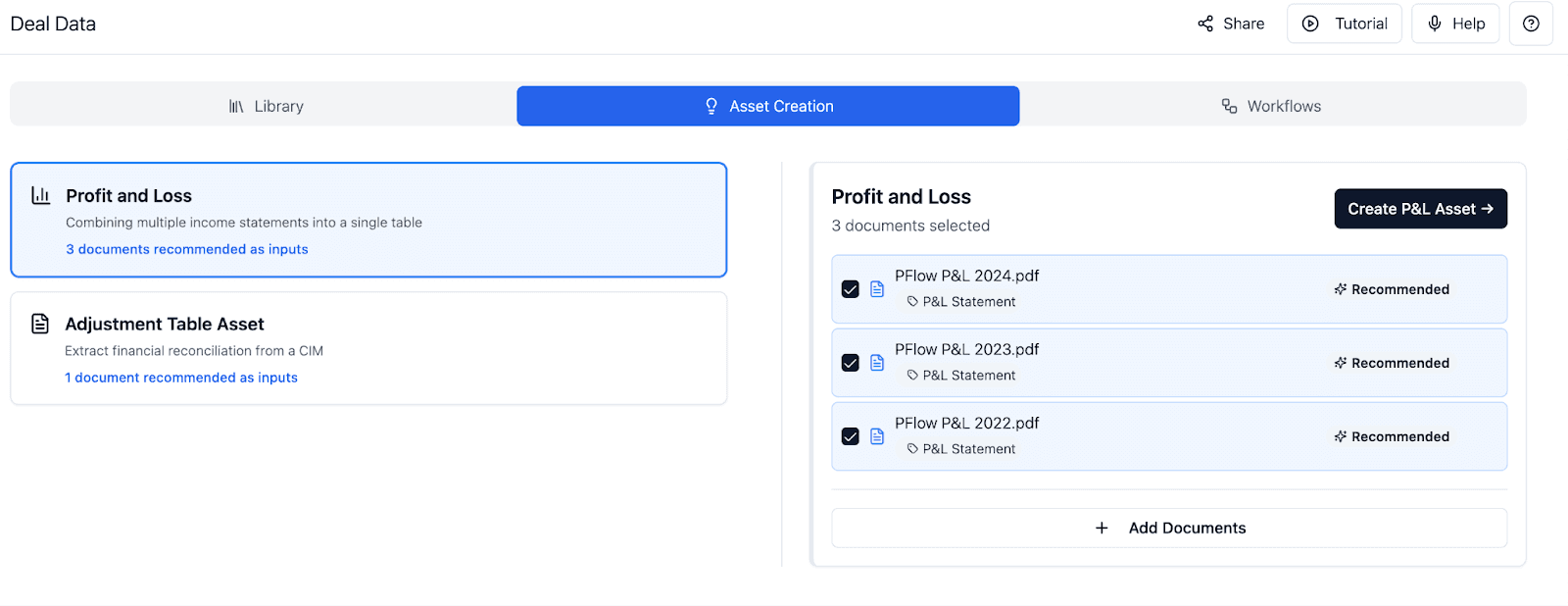
"Deal Assets combining monthly and annual P&L statements from different formats into unified view"
2. Automatic Line Item Reconciliation
"Sales" in 2022, "Revenue" in 2023, "Income" in 2024—Deal Assets recognize these as the same line item and consolidate them automatically. COGS categories that vary by year get mapped correctly. You get one clean, consistent P&L structure across all periods.
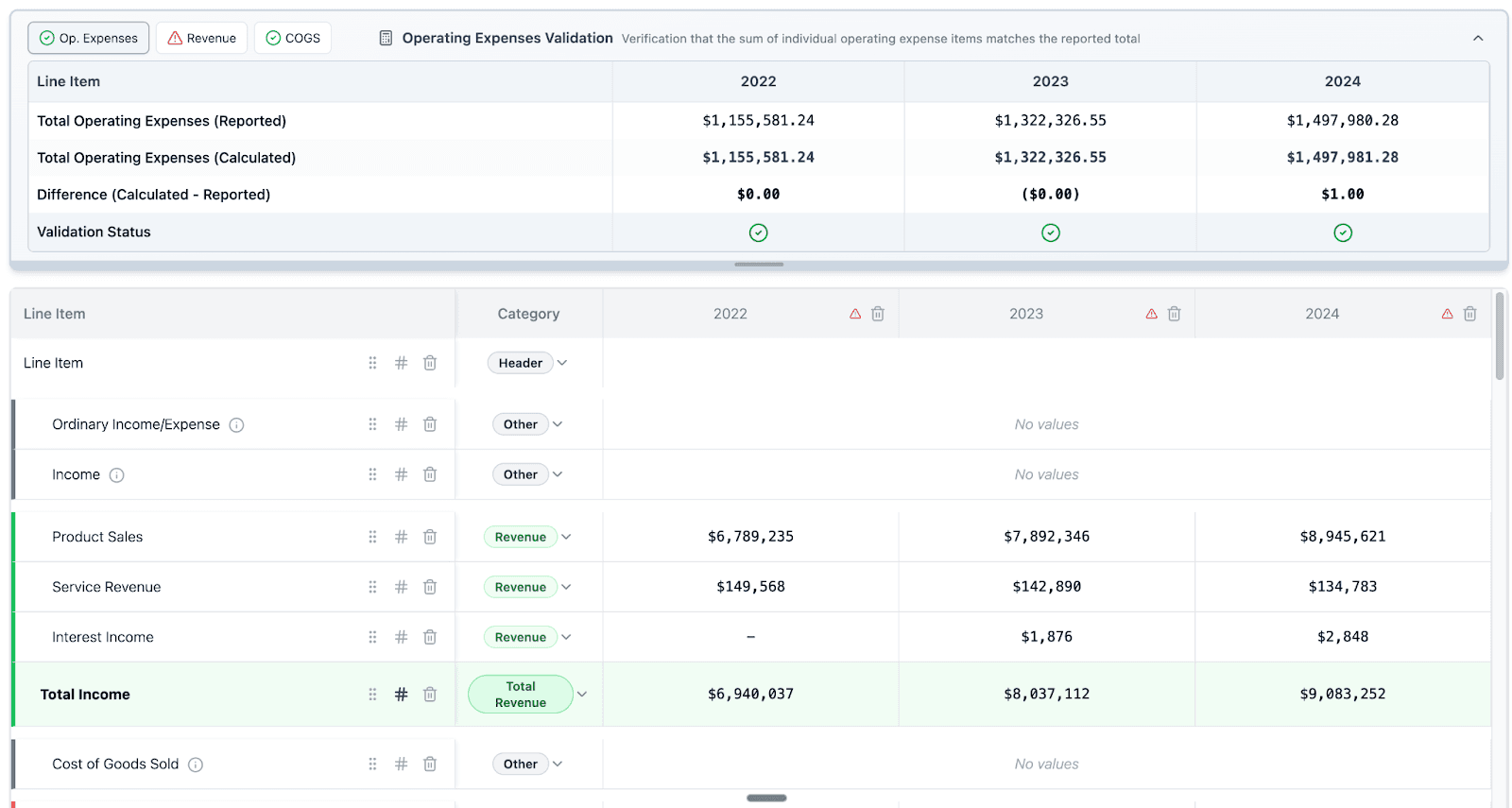
"Automatic line item reconciliation showing revenue categories mapped across years in DealSage"
3. Validation Checks for Subtotals, Sums, and Gaps
Deal Assets validate that subtotals actually sum to what they claim. Revenue + COGS + expenses should equal the bottom line—if they don't, it's flagged. Duplicated entries are caught. Missing amounts are calculated: "This subtotal shows $125K but line items sum to $118K. Gap: $7K." Now you can search the source document for that exact figure.
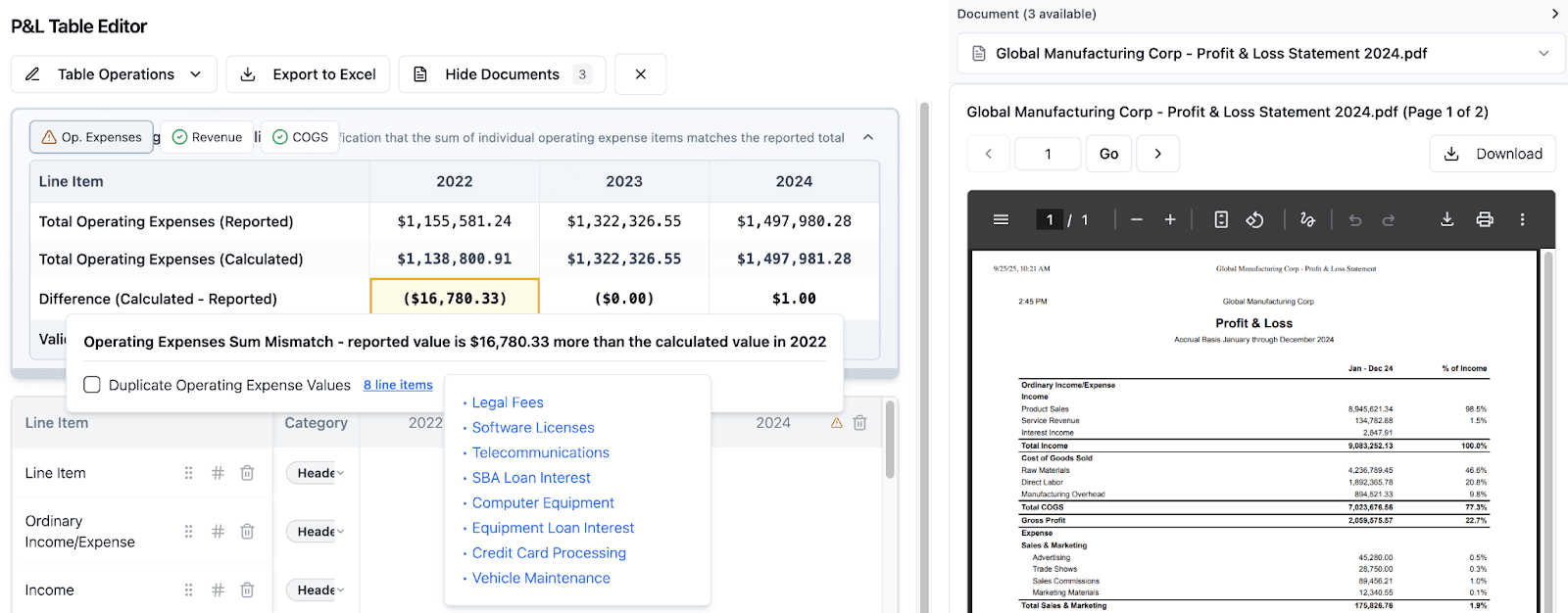
Image alt text: "Validation checks in DealSage flagging subtotal discrepancies and calculating missing amounts"
4. Side-by-Side Source Viewing with PDFs and Excel
Everything is presented in the order it appears in source documents, so you can do quick side-by-side validation. Source documents—including Excel files—can be viewed live in the app. You see which document and page each number came from, making verification fast and auditable.
Why This Matters: Building Models on Validated Financials
This isn't just about proprietary deals—though that's where you're most likely to encounter messy financials. Even in intermediated processes, you might receive numbers in the CIM and then get the actual financial statements from the data room. Deal Assets let you double-check that the CIM numbers match reality before you build your model.
Whether you're getting raw financials directly from an owner or validating a banker's summary against actual statements, you need the same thing: clean, reconciled P&Ls that you can trust.
Building your underwriting model on unvalidated financials is how deals go sideways. You miss a duplicated expense line. You miscategorize revenue. You use a subtotal that doesn't actually reconcile. Three weeks into diligence, you realize your margin assumptions are off by 400 basis points.
Deal Assets prevent this by catching validation issues in the first 48 hours, not after you've committed to an LOI.
Imagine you're evaluating a manufacturing business. The owner sends 36 months of QuickBooks exports. Using Deal Assets, you combine them into annual P&Ls in 30 minutes. The validation check flags that December 2023's revenue subtotal doesn't match its line items—gap of $43K.
You search the source document for $43K and find a duplicated "sales revenue" entry. You adjust, re-validate, and now you have clean financials for modeling. Without Deal Assets, this would have been buried in your Excel tabs and likely missed until much later.
Manual Excel Reconciliation vs. Deal Assets: What's Different?
Feature | Manual Excel Reconciliation | DealSage Deal Assets |
Time to reconcile | 5+ hours manually building master P&L | 30 minutes to combine and validate |
Line item mapping | Manual categorization across periods | Automatic reconciliation even with different labels |
Validation checks | Manual formula checking, error-prone | Automatic subtotal, sum, and gap validation |
Duplicate detection | Easy to miss | Automatically flagged |
Source viewing | Switch between files and Excel | View PDFs and Excel live in app, side-by-side |
Format handling | Difficult with mixed PDFs and Excel | Works seamlessly with any format |
Step-by-Step: Getting Started with Deal Assets for P&Ls
Upload your P&L statements
Monthly, quarterly, annual—whatever mix of PDFs and Excel files you received from the business ownerDealSage creates Deal Assets
Each P&L becomes a structured Deal Asset with automatic line item extractionReview automatic reconciliation
See how line items map across periods, view flagged inconsistencies and validation issuesInvestigate flagged items
Check subtotal mismatches, duplicates, gaps—view source documents side-by-side to verifyExport validated P&L or continue in DealSage
Export to Excel as a linked model for further analysis, or continue to audit workflow in DealSage
You now have clean, validated financials instead of messy owner-provided statements.
Pro Tips
Pro Tip #1:
Deal Assets are specifically designed for complex financial data requiring precision. For simple table extraction from CIMs and marketing materials, use Data Tables. For messy owner-provided P&Ls, QuickBooks exports, and detailed financial statements, always use Deal Assets.
Pro Tip #2:
Pay close attention to flagged gaps where subtotals don't match line items. Deal Assets calculates the exact missing amount, which you can then search in the source document. This is how you catch duplicated entries or miscategorized items that would otherwise hide in your Excel model.
What This Means for Your Deal Process
Whether you're doing proprietary deals with raw owner financials or validating CIM numbers against data room statements, you need the same rigorous financial validation.
Deal Assets give you institutional-grade financial reconciliation regardless of deal source. You get clean, validated P&Ls in 30 minutes instead of 5+ hours of manual Excel work.
Once you've created validated Deal Assets, you can:
Export to Excel for your financial model
Run through DealSage's audit workflow to check for overstated earnings
Reference with @ button in any analysis
Store as permanent record for diligence documentation
This is how you move fast on any deal without sacrificing financial accuracy.
Frequently Asked Questions
Q: What's the difference between Data Tables and Deal Assets for financials?
A: Data Tables are perfect for quick extraction from CIMs and marketing materials—fast, simple, good for standard information. Deal Assets are designed for complex financial reconciliation: messy owner-provided P&Ls, QuickBooks exports, statements that need to be combined across periods. Deal Assets include automatic line item mapping, validation rules, subtotal checking, and more robust handling of inconsistent formats. Use Data Tables for speed, Deal Assets for precision with complex financials.
Q: Can Deal Assets handle really messy QuickBooks exports with broken formatting?
A: Yes. Deal Assets are specifically designed for this. The system recognizes P&L structures even when formatting is inconsistent, labels vary, and Excel formulas are broken. For particularly unusual formats, you can make manual adjustments to line item mappings while preserving the validation framework and source documentation.
Q: What happens after I create validated Deal Assets?
A: You have several options: (1) Export to Excel as a linked, reconciled P&L for your financial model, (2) Continue to DealSage's audit workflow to check whether earnings are overstated (covered in the next feature), (3) Reference Deal Assets using @ button in any analysis, or (4) Store as permanent documentation for your diligence record. Deal Assets become a source of truth for the deal's financials.
Ready to Get Started?
Schedule a call with sales to see how Deal Assets transform messy owner-provided financials into validated P&Ls.
Questions about QuickBooks compatibility or complex reconciliation? Email harry@dealsage.io