

Extract, chart and combine data tables
DealSage automatically extracts, stores, and charts data tables from whatever you upload.
Articles
Nov 13, 2025
The PDF-to-Excel Hell Every PE Team Knows
You're three hours into copying revenue figures from a CIM into Excel. Page 27 has the historical P&L, but the formatting is broken. Page 43 has customer concentration data in a weird table layout. Page 61 has unit economics buried in a paragraph.
So you're manually typing numbers, cell by cell, hoping you don't transpose a digit or miss a decimal point. Then you realize you need to do this for three more deals before tomorrow's meeting.
This is the manual grunt work that eats 6+ hours per deal—and it's exactly what AI should be doing instead of humans.
DealSage eliminates it by automatically extracting, storing, and making queryable every data table from every deal document.
How Data Table Extraction Works
Instead of manual copy-paste, DealSage recognizes and structures every table in your deal documents automatically.
Here's what happens: Upload your CIM, financials, or management presentation. DealSage identifies every data table—P&Ls, balance sheets, customer lists, unit economics, KPI dashboards, revenue breakdowns, anything in a structured format.
Every table gets extracted, validated, and stored in your central data repository. From there, you can chart them, combine them across deals, export them to Excel, or reference them using the @ button in any analysis.
https://www.youtube.com/watch?v=zek5nehz1Nk
"DealSage automatically extracting financial tables from private equity CIM document"
Four Ways to Work with Your Data Tables
1. Auto-Extract Any Table from Deal Documents
Upload a CIM and watch DealSage pull out every table: P&Ls, balance sheets, customer concentration tables, unit economics. No manual typing. No formatting fixes. Just clean, structured data in seconds.
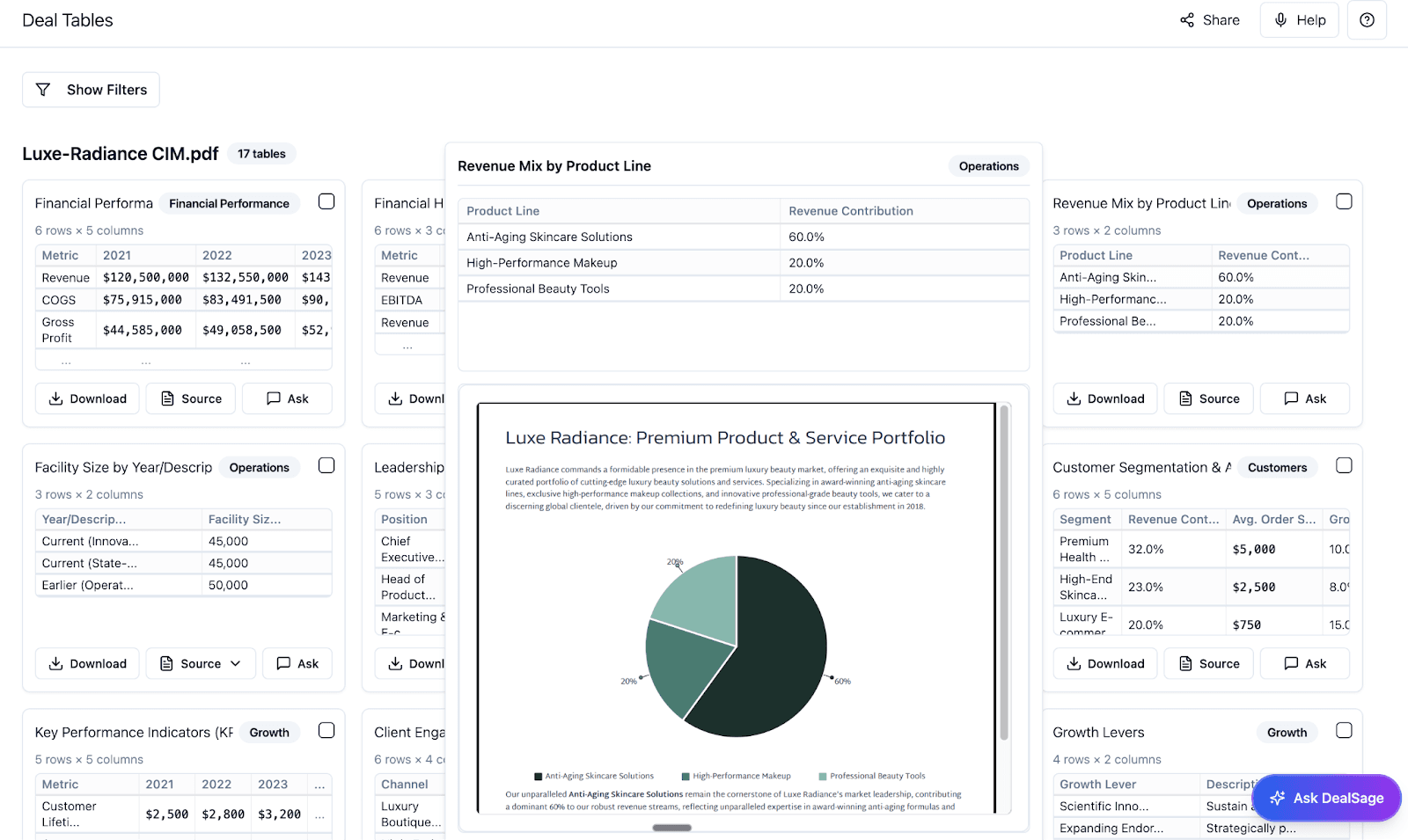
"Automatic extraction of multiple financial tables from PE deal document in DealSage"
2. Store Everything in One Central Repository
Every table from every deal lives in one searchable database. No more "which Excel file has that comp set?" No more rebuilding tables from scratch. Search by deal name, table type, date range, or any metric.
Hover over any data point in a table and see exactly where it came from—the source document, page number, and original context. Click through to verify. Every number is traceable.
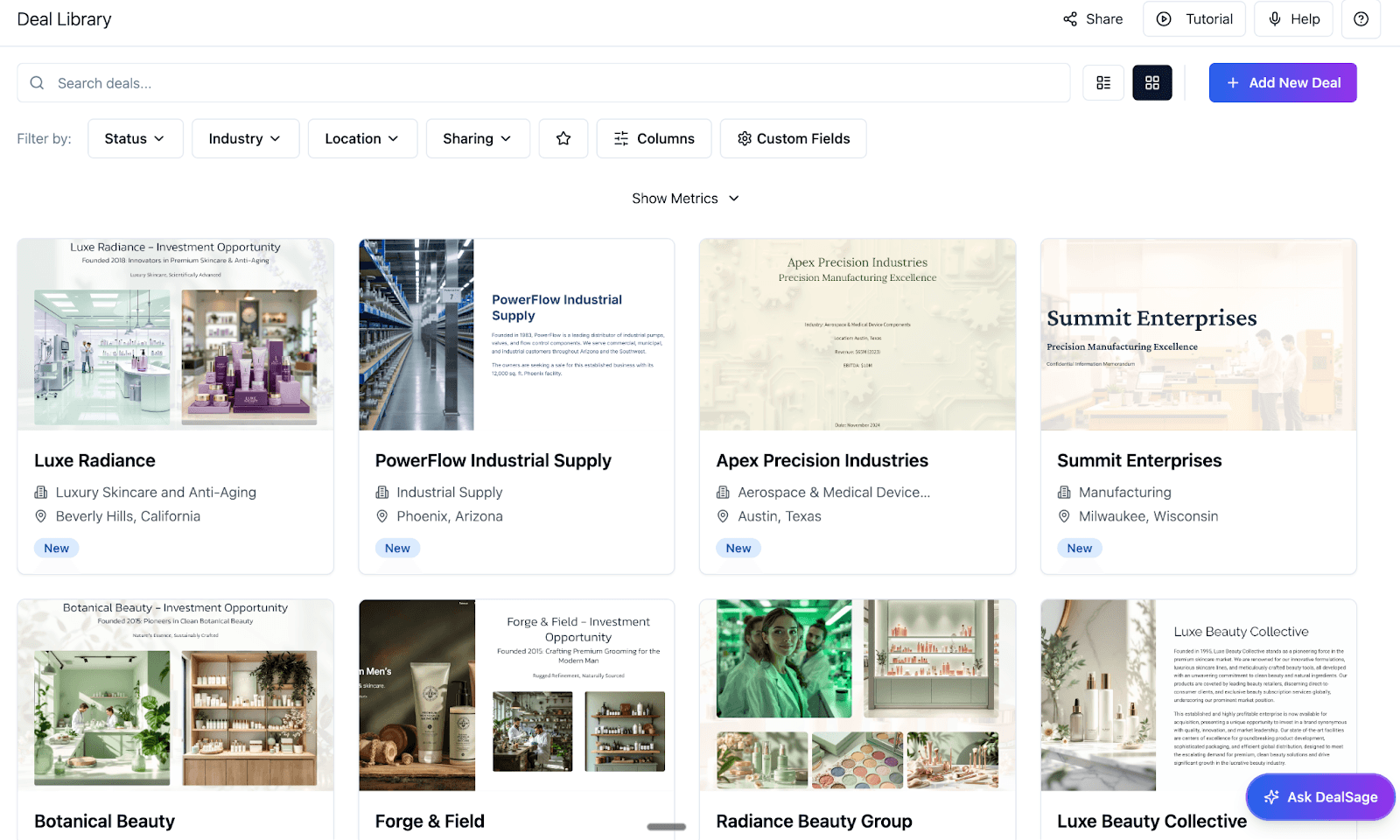
"Centralized data table repository showing searchable deal tables with source tracing in DealSage"
3. Chart and Visualize Dynamically
Turn any table into charts with one click. Revenue trends, margin evolution, customer concentration over time—visualize instantly. Update the underlying data and your charts update automatically.
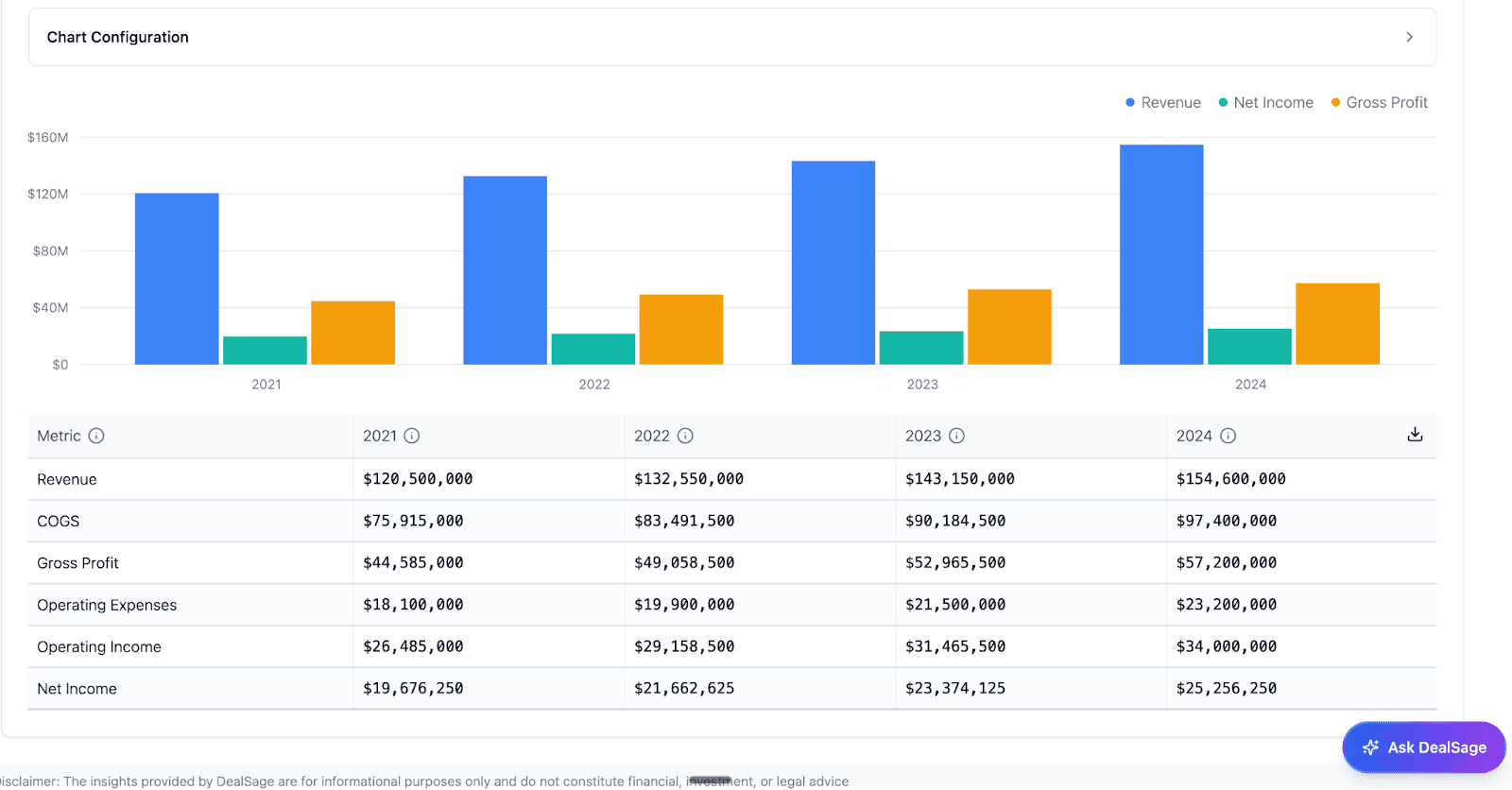
"Dynamic chart creation from extracted financial tables in DealSage for PE analysis"
4. Combine Tables Across Deals for Benchmarking
Building a competitive benchmark? Pull revenue tables from 10 similar deals and overlay them instantly. Compare margin profiles across your portfolio. Analyze customer concentration patterns. All without leaving DealSage or touching Excel.
Data Tables vs. Deal Assets: When to Use Each
Data Tables are perfect for CIMs and marketing materials—quick extraction, instant visualization, good for standard financial summaries and market data.
Deal Assets are designed for complex, data-heavy inputs like detailed profit and loss statements and balance sheets. Deal Assets include a more rigorous validation process for when precision matters most.
For simple extraction and charting, use Data Tables. For comprehensive financial analysis requiring validation, use Deal Assets.
Why This Matters: ROI Beyond Time Savings
One of our customers was spending 6 hours per deal just on financial data extraction—making sure tables were copied correctly, that numbers matched across documents, that formatting was consistent enough to analyze.
With DealSage, that process takes 10 minutes. Upload documents, wait for extraction, validate, and move on.
That's 5 hours and 50 minutes back per deal. At 100 deals per year, that's 580 hours—or three full months of analyst time returned to actual analysis instead of data entry.
But it's not just about speed. It's about accuracy. Manual data entry creates errors. Transposed numbers, missed decimals, wrong formulas—these are the mistakes that lead to bad underwriting. DealSage's automated extraction eliminates that risk.
Manual Excel vs. DealSage: What's Different?
Feature | Manual Excel Process | DealSage |
Table extraction | 4-6 hours per deal manually | 10 minutes automatic |
Data accuracy | Prone to manual entry errors | Validated extraction with source links |
Central storage | Scattered across Excel files | One searchable repository |
Cross-deal comparison | Hours of manual consolidation | Instant table combinations |
Chart creation | Manual Excel charting | One-click visualization |
Reusability | Rebuild tables for each analysis | Permanent, queryable library |
Step-by-Step: Getting Started
Upload your deal documents
CIMs, profit and loss statements, balance sheets, management presentations—whatever has tables.DealSage extracts every table automatically
P&Ls, customer lists, unit economics, KPIs—everything structured and validatedReview and validate extractions
Quick check that tables are accurate (they almost always are), flag any issues.Use tables in your analysis
Chart them, combine them with other deals, export to Excel, or reference with @ in the assistant.Build your proprietary data library
Every table becomes permanently searchable and reusable across your entire deal pipeline.
Your data library compounds with every deal you process.
Pro Tips
Pro Tip #1:
Upload multiple documents at once when you first set up DealSage. This builds your table library faster and immediately gives you cross-deal comparison capabilities.
Pro Tip #2:
Data Tables are great for CIMs and marketing materials. For more complex financial information like detailed P&Ls and balance sheets, check out Deal Assets—they include a more rigorous validation process for precision-critical analysis.
What This Means for Your Deal Process
This isn't just about faster data extraction. It's about building institutional knowledge that compounds.
After 50 deals, you have 50 sets of financial tables—structured, validated, and queryable. Need to know how SaaS companies at $5M ARR typically break out their revenue? Query your table library. Want to see margin trends for healthcare services businesses? Your data answers immediately.
Every table you extract makes your next evaluation faster and smarter. This is the intelligence layer that gives you an unfair advantage.
Frequently Asked Questions
Q: How accurate is the table extraction?
A: Accuracy is typically well above 95%—often higher—because extraction is essentially copying and pasting structured data, which AI excels at. There's no reasoning or interpretation involved, just pulling data from tables into structured format. That said, we've built in sourcing so you can hover over any data point to see exactly where it came from, and you can edit any table dynamically to make updates if needed. Every extraction is verifiable and adjustable.
Q: What if a table spans multiple pages or has merged cells?
A: Data Tables handle most standard table formats well, including simple multi-page tables. However, for complex data sets with intricate formatting, merged cells, or unusual layouts—especially detailed financial statements—Deal Assets are the better option. Deal Assets include a more rigorous validation process designed specifically for complex financial data.
Q: Can I export my extracted tables to Excel for modeling?
A: Yes. Every table can be exported to Excel with one click, preserving all formatting and formulas. You can export individual tables, collections of tables, or your entire data library. This makes DealSage compatible with whatever modeling workflows you already use—it's an intelligence layer, not a replacement for your tools.
Ready to Get Started?
Schedule a call with sales to see how DealSage transforms your data extraction process.
Questions about extraction accuracy or compatibility? Email harry@dealsage.io